
Shoppers who utilize internal site search are up to 300% more likely to convert than passive browsers. They arrive on your site with explicit purchasing intent, already knowing what they want. However, default WooCommerce themes force customers through a painfully slow cycle: type a query, press Enter, wait for a complete page reload, and sift through an unrefined archive grid. If they mistype by a single character or miss an exact title, they bounce.
Modern eCommerce giants like Amazon and Target train customers to expect predictive, instant search suggestions as they type. In this step-by-step tutorial, you will learn how to add a lightning-fast, predictive live AJAX instant search bar to your WooCommerce store using the 100% free core version of SiteSkyline Smart Sales.
⚡ Key Takeaways for WooCommerce Merchants
- Zero Page Reloads: Queries execute via asynchronous REST endpoints that stream instant results to a floating dropdown overlay in milliseconds.
- Multi-Dimensional Search Results: Simultaneously displays matching product categories, autocompleted keyword phrases, and rich product preview cards.
- Instant Price & Badge Visibility: Live product preview cards display current sale prices and promotional badges directly in the dropdown.
- Sub-15ms Transient Caching: Frequently queried search terms are cached in memory to protect your MySQL database during viral flash sales.
- Behavioral Intent Weighting: Customer search queries are logged to feed real-time recommendation engines, improving catalog-wide cross-selling accuracy.
- Theme-Agnostic Design: Automatically enhances standard WooCommerce search widgets or embeds seamlessly anywhere via shortcode
[[ssmasa_search_bar]].
Why Default WooCommerce Search Kills Customer Conversions
Standard WordPress core search was originally engineered for blog posts and article archives. When applied to WooCommerce product catalogs, it introduces friction:
- Lack of Real-Time Feedback: Visitors receive zero visual confirmation while typing, leading to uncertainty about whether the store carries the product.
- High Abandonment Rate: If a customer misspells a keyword or searches for a general term like “hood,” they are taken off their current page to a full search archive.
- Heavy Database Impact: Uncached
LIKE %keyword%database queries on large catalogs cause severe server lag during peak traffic hours.
SiteSkyline Smart Sales replaces this friction with an intelligent, multi-layered predictive search engine that operates entirely client-side with server-cached responses.
Step 1: Enable the Predictive Smart Search Engine
To get started, open your WordPress administrative dashboard and navigate to Smart Sales > Optimizations. Scroll to the Predictive Smart Search module card.

Toggle the master switch to نشيط. When enabled, Smart Sales hooks into get_product_search_form and enqueues the lightweight, non-blocking predictive search scripts across your storefront.
Step 2: Customize Overlay Styling & Display Options
Next, click the تخصيص button on the Predictive Smart Search card to reveal display options:

- Search Placeholder Text: Enter inviting placeholder guidance such as “Search products, brands, and categories…” to encourage shopper discovery.
- Show Price in Live Results: When active, customers see real-time price tags (including sale discounts and currency formatting) directly inside each product preview row.
- Show Badge in Live Results: Merchandising badges like “Best Seller” or “Trending” appear beside product titles within the instant search dropdown.
- Maximum Live Results: Set the maximum products displayed in the dropdown (recommended: 4 to 6) to keep the overlay concise and thumb-friendly.
Step 3: Configure Search Intent Telemetry & High-Traffic Caching
تحت Smart Sales > Settings, you can inspect how customer search queries feed directly into your store’s machine learning matrix. Smart Sales allocates a dedicated Search Intent Attribution weight to queries, connecting what shoppers search for with what they eventually purchase.

To safeguard your database, all keyword lookup queries are automatically transient-cached. If fifty visitors type “hoodie” within a 10-minute window, only the first request queries the database; the remaining 49 requests are served instantly from memory with zero MySQL overhead.
Step 4: Live Storefront Floating Search Bar Preview
Visit your shop catalog page or any archive page. The search bar appears prominently with clean typography, rounded borders, and subtle shadow depth:

The input features an instant Clear button (×) that appears dynamically when text is present, allowing users to wipe their query in a single tap without backspacing.
Step 5: Predictive Live Autocomplete in Action
As soon as a shopper types two or more characters (e.g., “hood”), the floating autocomplete container immediately expands:

The predictive overlay organizes results into three intuitive sections:
- Matching Categories: Direct links to relevant taxonomies (e.g., “Hoodies”) for shoppers seeking broader browsing.
- Keyword Suggestions: Frequently searched terms highlighted in bold matching the entered keystrokes.
- Matching Products: High-definition product thumbnail cards showing exact title, stock availability, and current price (with strikethrough original prices on sale items).
Step 6: Frictionless Navigation to Matched Products
When a shopper clicks on any product preview card—such as Hoodie with Pocket—they bypass intermediate search archives entirely and arrive directly on the single product page:
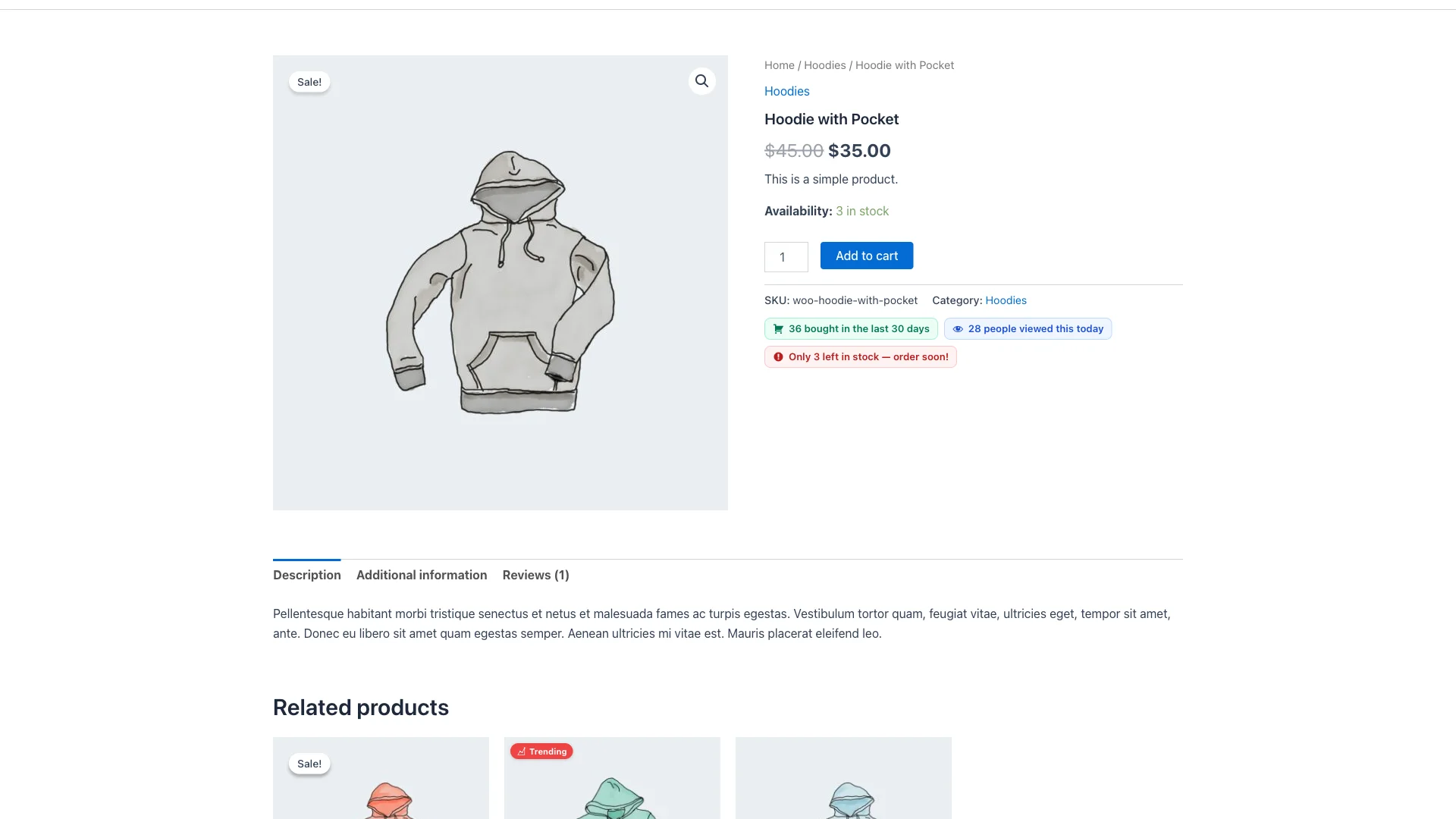
By eliminating multiple unnecessary page reloads and search results pagination, the checkout funnel is compressed, resulting in dramatically higher conversion rates and reduced cart abandonment.
Comparison: SiteSkyline Smart Search vs. Third-Party SaaS Search
| Capability | SiteSkyline Smart Sales (Free) | External SaaS Search (Algolia, Doofinder) |
|---|---|---|
| التكلفة الشهرية | 100% Free Forever | $29 – $299+ per month |
| Data Privacy (GDPR) | 100% On-Premise (Zero 3rd-party tracking) | Exports full catalog & user IP to external servers |
| Setup Complexity | 1-Click Toggle + Optional Shortcode | API keys, index sync webhooks, custom SDKs |
| Catalog Size Limits | Unlimited products supported | Strict pricing tiers based on records & search queries |
| Recommendation Synergy | Feeds directly into store recommendation model | Isolated data silo not shared with other store upsells |
| Mobile Responsiveness | Native CSS flexbox overlay with touch support | Requires complex responsive stylesheet overrides |
Quick Setup Checklist
- ✅ Activate Predictive Smart Search تحت Smart Sales > Optimizations.
- ✅ Customize your Search Placeholder text to guide shoppers.
- ✅ Enable Show Price in Live Results for instant pricing clarity.
- ✅ Set Maximum Live Results between 4 and 6 products.
- ✅ Verify that Search Intent Attribution is enabled in Settings.
- ✅ Test search queries on desktop and mobile viewports.
الأسئلة المتداولة
Can I display the smart search bar anywhere on my website?
Yes. In addition to automatically enhancing standard theme search forms, you can insert the shortcode [[ssmasa_search_bar]] into any header, sidebar, footer, or custom page built with Elementor, Divi, Beaver Builder, or the Gutenberg Site Editor.
Will predictive search slow down my server with heavy traffic?
No. Smart Sales utilizes intelligent transient caching with configurable TTLs. Repeated search queries resolve from memory in sub-15ms without executing heavy SQL queries, making it ideal for high-traffic stores and flash sale campaigns.
Does predictive search search product SKUs as well as titles?
Yes. The search engine queries product titles, categories, and SKU identifiers, allowing B2B buyers and repeat customers to locate exact inventory matches instantly.
Is this predictive search feature 100% free?
Yes. The live AJAX predictive search engine, category scoping, keyword autocompletion, transient caching, and customizer styling controls are completely free in SiteSkyline Smart Sales.