Are you looking for the fastest way to get your WordPress posts, pages, and images indexed by search engines? Look no further than an خريطة موقع XML paired with IndexNow.
An XML sitemap is a structured file that tells search engines like Google, Bing, and Yandex which URLs exist on your website, when they were last updated, and where to find rich media like images and videos. But traditional sitemaps have a major flaw: search engine bots may take days, weeks, or even months to come back and re-crawl your sitemap files.
That is where the groundbreaking IndexNow protocol comes in. Created by Microsoft Bing and supported by major search engines, IndexNow allows your WordPress site to instantly ping search engines the second you publish or update content, triggering automated crawl bots within seconds!
In this step-by-step tutorial, we’ll show you how to generate dynamic XML sitemaps, configure Google News feeds, and set up instant IndexNow pings in WordPress using Sky SEO Manager—completely free and with zero coding.
Why Do You Need an XML Sitemap & IndexNow in WordPress?
While WordPress 5.5 introduced basic native sitemaps, they lack crucial technical features like image sitemaps, Google News feeds, custom post type filters, and real-time search engine pings.
Here is why a dedicated XML Sitemap with IndexNow is essential for modern websites:
- Faster Indexing for New Content: Without a sitemap, search engines have to discover new pages through internal links. A dynamic sitemap guarantees search engines find newly published pages immediately.
- Image & Video SEO: Including images in your XML sitemaps directly boosts visibility in Google Images and video carousels.
- تحسين ميزانية الزحف: Search bots waste less time crawling unchanged pages by referencing accurate
<lastmod>timestamps. - Instant IndexNow Pings: Rather than waiting for passive crawler visits, IndexNow proactively informs Bing, Yandex, and Seznam the millisecond your content goes live.
- Google News Eligibility: A specialized Google News sitemap with a 48-hour article window is required for publishers wanting to appear in Google News feeds.
Step 1: Configure Dynamic XML Sitemap Settings
First, make sure the free Sky SEO Manager plugin is installed and activated on your website.
في لوحة تحكم إدارة WordPress الخاصة بك، انتقل إلى SEO Manager → Sitemap.
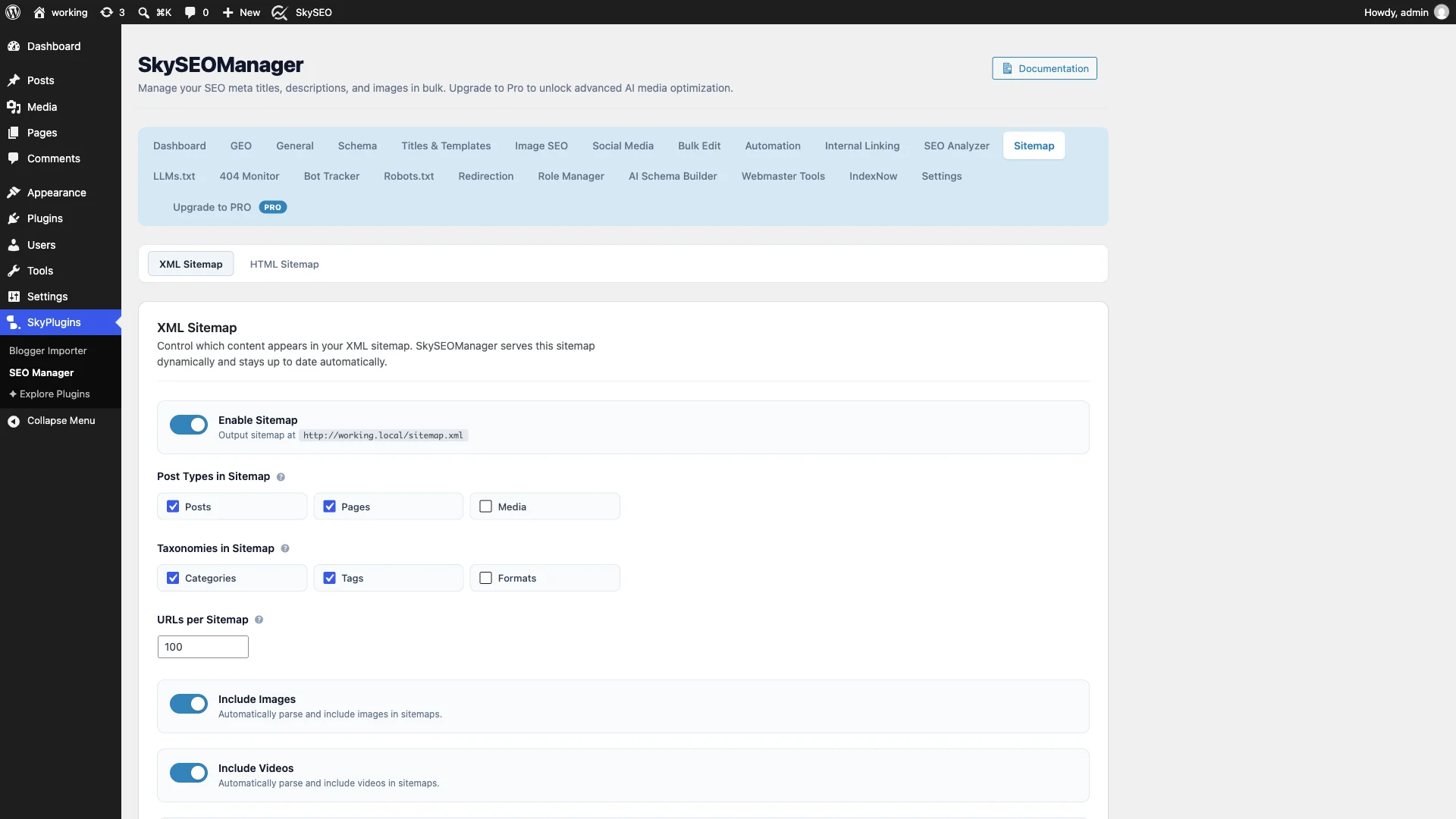
Key configuration options to customize:
- Enable Sitemap: Toggle this on to serve your sitemap index dynamically at
/sitemap.xml. - Post Types in Sitemap: Check دعامات و الصفحات. Leave non-public or utility post types unchecked.
- Taxonomies in Sitemap: Check فئات و العلامات if your archive pages contain unique content.
- URLs per Sitemap: Choose the chunk size (default: 100). For large websites with 50,000+ posts, Sky SEO automatically splits content into clean numbered sub-sitemaps.
- Include Images & Videos: Enable both checkboxes so featured images and embedded videos are indexed by Google.
- Prioritize Cornerstone Content: Give your flagship articles a higher priority rating (e.g., 1.0) compared to regular posts (0.8).
Step 2: Set Up a Dedicated Google News Sitemap
If your website covers breaking news, industry announcements, or timely guides, scroll down to the خريطة موقع أخبار جوجل قسم.
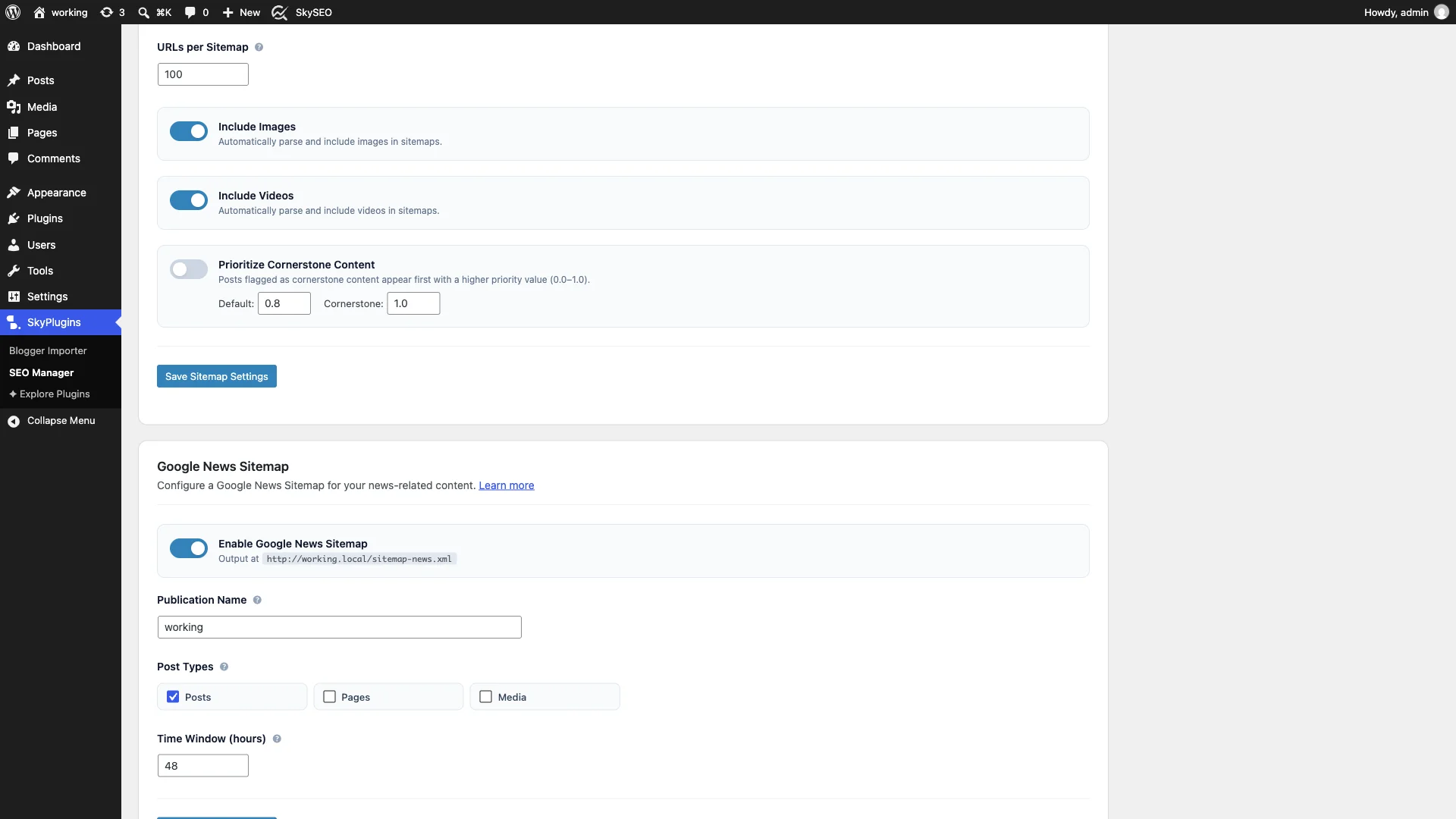
Google News guidelines require a dedicated XML feed that only includes articles published within the last 48 hours. Simply enter your Publication Name, set the Time Window to 48 hours, and click Save Sitemap Settings. Your news feed will be served dynamically at /sitemap-news.xml.
Step 3: Review Generated Dynamic Sitemap Files
قم بالتمرير لأسفل إلى Sitemap Status card to inspect your generated sitemaps.
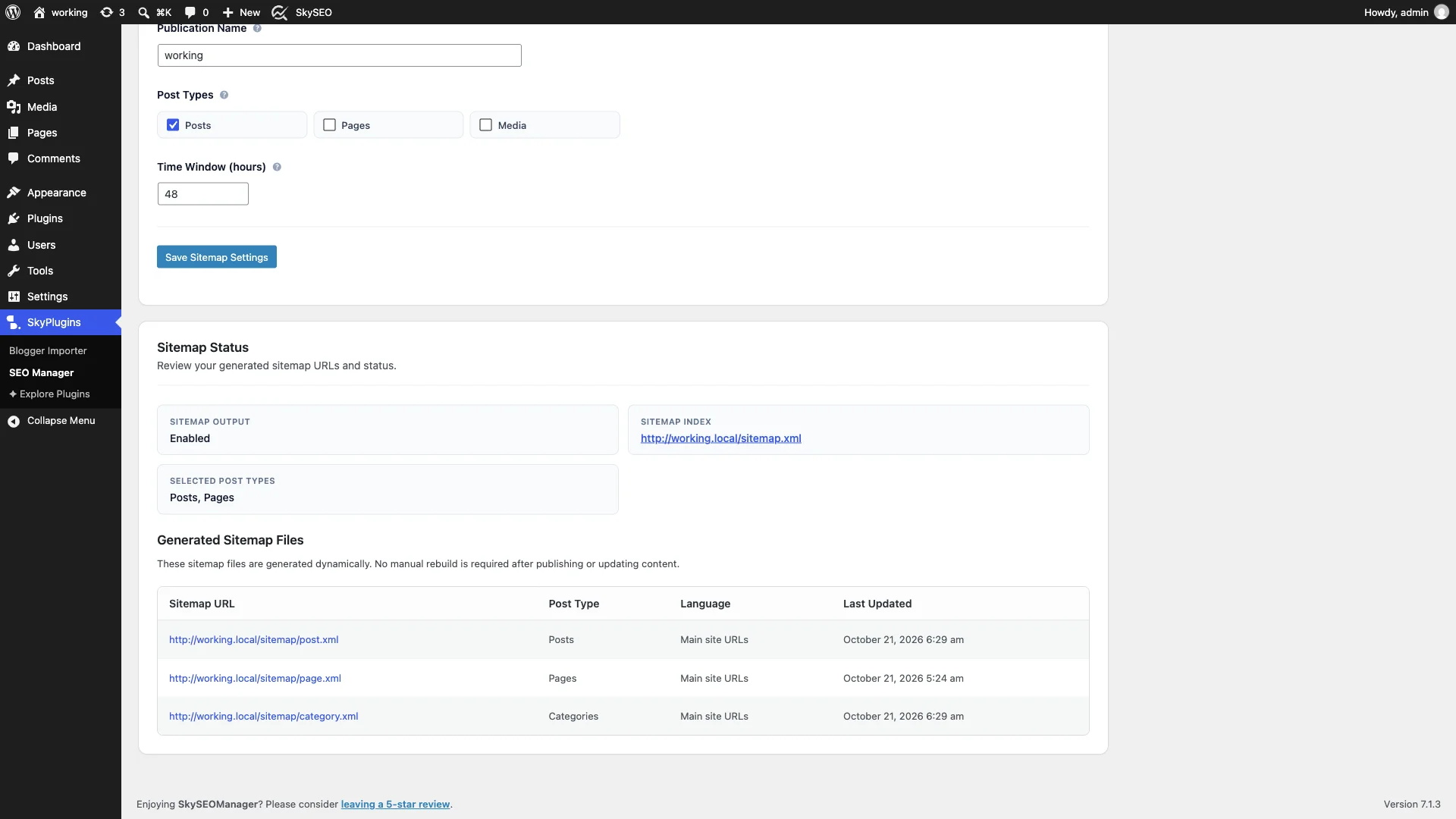
Unlike outdated plugins that generate static .xml files on your server’s disk (which frequently suffer from file permission errors or outdated caches), Sky SEO Manager generates your sitemaps dynamically in real time. The moment an article is published or edited, the sitemap updates instantaneously!
Step 4: View Your Live XML Sitemap in the Browser
Click on the main sitemap link (or visit https://yourdomain.com/sitemap.xml in your browser) to preview the live output.

The sitemap index neatly references child XML files for posts, pages, and categories. Opening any child file (such as /sitemap/post.xml) reveals rich metadata including post URLs, last modified dates, image titles, and image source paths.
Step 5: Activate IndexNow for Instant Search Engine Pings
While an XML sitemap provides a roadmap, search engine bots still need to crawl it. To eliminate the crawl delay completely, navigate to SEO Manager → IndexNow.
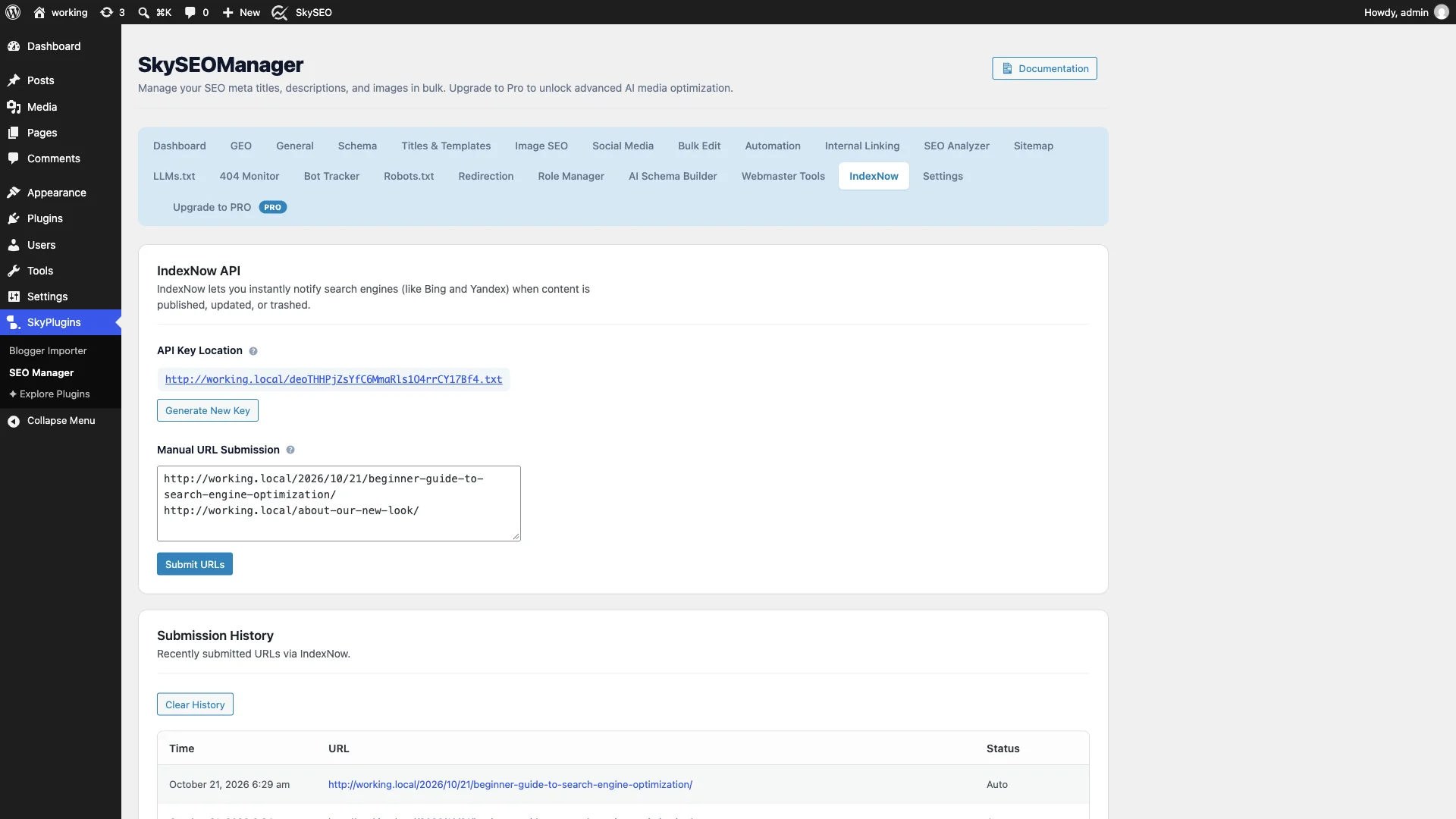
Sky SEO Manager automatically generates a unique IndexNow API key and serves it as a verification .txt file at your root URL. There is no manual file uploading or DNS TXT record configuration required!
You can also use the Manual URL Submission box to paste any recently updated URLs and click Submit URLs to trigger an immediate ping to search engines.
Step 6: Monitor Automated IndexNow Submission History
Best of all, you don’t even need to submit URLs manually! Every time you publish a new article or update an existing post in WordPress, Sky SEO Manager automatically sends an asynchronous IndexNow ping in the background.

ال Submission History table displays a real-time log of every submitted URL, the exact timestamp, and the delivery status (Auto). Search engine bots from Bing and Yandex typically respond to IndexNow notifications by crawling and indexing your updated pages within minutes!
How to Submit Your XML Sitemap to Google Search Console
To ensure Google monitors your sitemap continuously, follow these simple steps:
- Log in to your وحدة تحكم بحث جوجل dashboard.
- Select your website property from the top-left dropdown.
- In the left sidebar, click on خرائط الموقع (under Indexing).
- تحت Add a new sitemap, enter
sitemap.xml. - انقر يُقدِّم. Google will verify the sitemap and display a green نجاح status.
XML Sitemap vs. IndexNow: Feature Comparison
Understanding how XML Sitemaps and IndexNow complement each other is vital for complete technical SEO:
| ميزة | خريطة موقع XML | IndexNow |
|---|---|---|
| Supported Search Engines | Google, Bing, Yahoo, Yandex, DuckDuckGo | Bing, Yandex, Seznam, Naver (Pings shared across engines) |
| Discovery Method | Passive (Search engines periodically crawl sitemap) | Active (Your site notifies search engines immediately) |
| Indexing Speed | Hours to weeks depending on crawl frequency | Seconds to minutes |
| Media Metadata | Includes images, videos, and news tags | Focuses on page URLs and HTTP status changes |
| Setup Complexity | Zero configuration (Automatic in Sky SEO) | 1 Click (Automatic API key generation) |
Frequently Asked Questions (FAQs)
Does Google support IndexNow?
Google currently tests IndexNow but relies primarily on XML Sitemaps and standard crawl schedules for public web pages. Microsoft Bing, Yandex, Seznam, and other major engines fully support IndexNow. Using both an XML Sitemap and IndexNow in Sky SEO Manager gives you 100% coverage across all search engines.
What is the difference between sitemap.xml and sitemap_index.xml?
Both URLs serve the same purpose! While Yoast SEO uses sitemap_index.xml, Sky SEO Manager provides compatibility rewrites for both /sitemap.xml و /sitemap_index.xml, ensuring Google Search Console and Bing Webmaster Tools never hit a 404 error regardless of which URL format you submit.
Will password-protected or draft posts appear in the sitemap?
No. Sky SEO Manager strictly excludes draft posts, private pages, password-protected content, and any posts flagged with noindex robots meta tags, ensuring only public, crawlable content reaches search engines.
Do I need to generate an IndexNow API key manually?
No! Sky SEO Manager automatically generates a cryptographically secure IndexNow key upon activation and hosts the verification text file dynamically. You never need to touch FTP or upload verification files manually.
Conclusion: Get Your Content Indexed at Lightning Speed
Publishing great content is only half the battle—search engines must discover and index your pages before you can rank and earn traffic. By combining dynamic XML sitemaps with instant IndexNow pings in Sky SEO Manager, you eliminate indexing delays and put your content in front of readers faster than ever before.
Ready to automate your sitemaps and IndexNow pings? Download Sky SEO Manager for free on WordPress.org today!