Writing high-converting email marketing copy is one of the most time-consuming hurdles for WooCommerce merchants and WordPress site owners. Staring at a blank screen trying to formulate urgency-driven subject lines, engaging promotional hooks, and multi-step drip logic often delays revenue-generating campaigns by days or weeks.
With artificial intelligence transforming marketing workflows, you no longer need expensive freelance copywriters or bloated third-party AI writing subscriptions. SiteSkyline Email Campaign Manager Pro features a built-in एआई अभियान निर्माता powered by Google’s cutting-edge Gemini models. It doesn’t just write individual sentences—it architectures entire multi-step email automations, complete with triggers, delay schedules, audience conditions, and personalized body copy with dynamic merge tags, right from your WordPress dashboard.
Why Native WordPress AI Outperforms Generic Chatbots
While general-purpose chatbots like ChatGPT or Claude can draft generic marketing prose, copying and pasting text into WordPress is cumbersome and disconnected from your store’s underlying data. Here is why SiteSkyline’s native AI engine provides a decisive competitive edge:
- Full Campaign Orchestration: Rather than returning plain text blocks, SiteSkyline AI generates the entire automation schema—calculating trigger types, parent-child branch conditions (opened vs. not opened), and delay intervals.
- Direct Merge Tag Synthesis: The AI automatically weaves native WooCommerce and WordPress tokens (
{{customer.name}},{{coupon.code}},{{order.total}},{{site.url}}) directly into subject lines and copy. - Multi-Tiered Model Flexibility: Choose between lightweight, ultra-fast generation via Gemini Flash Lite or deep strategic campaign structuring via Gemini Pro.
- Interactive AI Refinement: Give iterative conversational feedback (e.g., “Make Step 2 more urgent” या “Add free shipping for carts over $50”) and watch the campaign update in real time.
- Zero Monthly Copywriter Overheads: Use your own Google Gemini API key with generous free quotas—eliminating recurring SaaS copy generation subscriptions.
Comparison: Generic AI Tools vs. SiteSkyline Native AI Engine
| विशेषता | Generic External AI (ChatGPT / Jasper) | SiteSkyline Email Campaign Manager Pro |
|---|---|---|
| Workflow Output | Unformatted raw text snippets | Structured multi-step automation campaigns ready to deploy |
| WordPress Integration | Manual copy-pasting into each step | 1-Click direct creation into active/draft WordPress post type |
| Dynamic Merge Tags | Hallucinates brackets or generic placeholders | Injects authentic SiteSkyline tokens ({{coupon.code}}, etc.) |
| Audience Rule Mapping | Cannot set WP database rules | Sets days-since-order, cart totals, and user roles automatically |
| Cost Structure | $20 to $99/month recurring subscriptions | Direct Gemini API access (Generous free tier / pay-as-you-go fractions of a cent) |
Step-by-Step Guide: Generating Complete Campaigns with AI
Step 1: Open the AI Campaign Builder & Configure Gemini
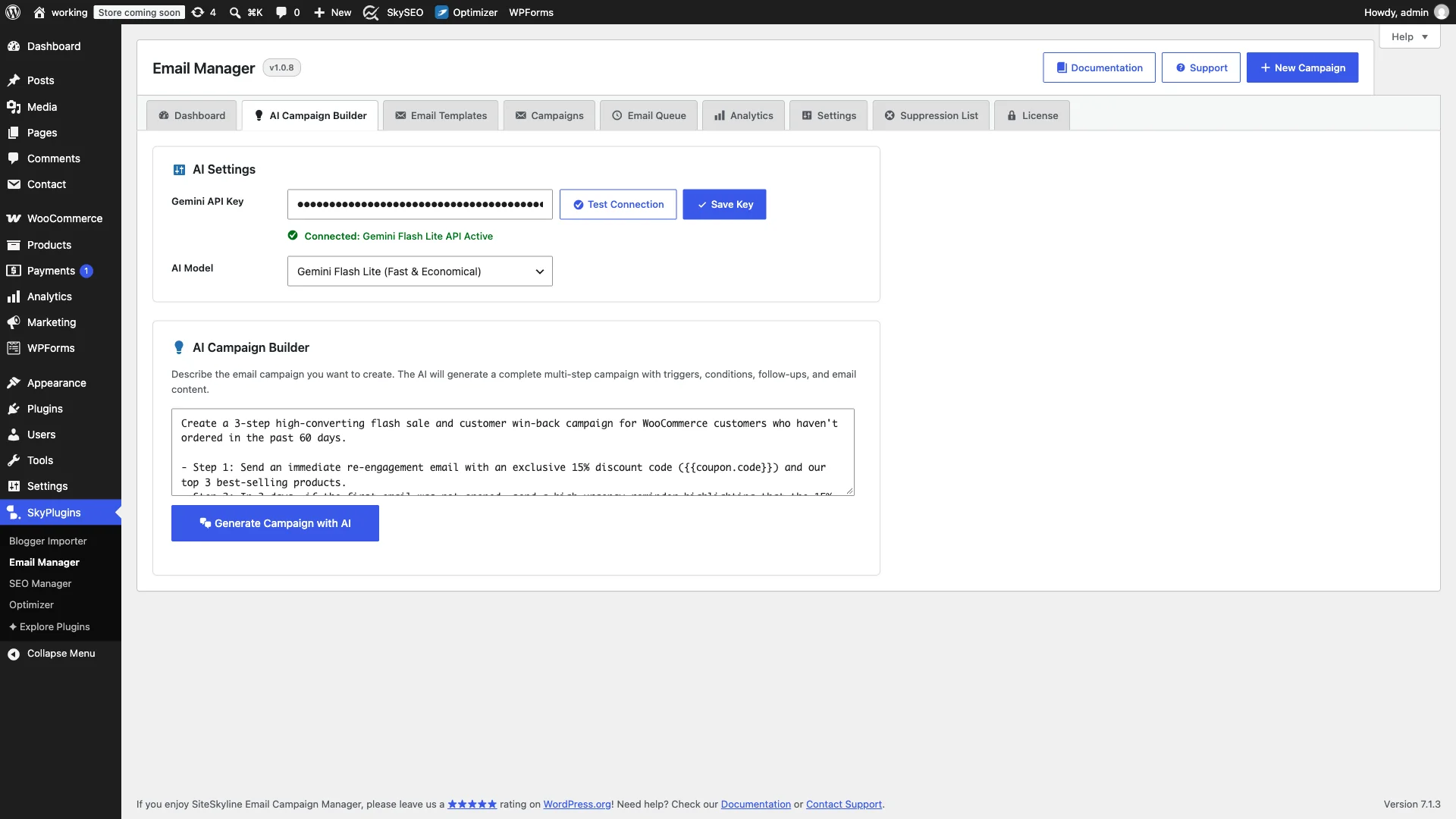
अपने WordPress डैशबोर्ड से, यहां जाएं Email Manager → AI Campaign Builder. In the एआई सेटिंग्स panel, paste your Google Gemini API key (obtainable for free via Google AI Studio). Select your preferred model tier from the dropdown:
- Gemini Flash Lite: Blazing-fast response speeds with economical token usage. Ideal for high-volume subject line testing and rapid drafts.
- Gemini Flash: Balanced speed and creative quality for comprehensive drip campaigns.
- Gemini Pro: Maximum creative reasoning and sophisticated multi-branch lifecycle sequences.
क्लिक कनेक्शन जांचें to confirm API authorization, then click Save Key.

Step 2: Define Your Campaign Goals in the Prompt Canvas
नीचे स्क्रॉल करें एआई अभियान निर्माता canvas. In the prompt area, describe what you want to achieve using natural, conversational language. Be sure to outline your target audience, core offer, and timing expectations.
For example: “Create a 3-step high-converting flash sale and customer win-back campaign for WooCommerce customers who haven’t ordered in the past 60 days. Step 1: Send an immediate re-engagement email with an exclusive 15% discount code and our top 3 best-selling products. Step 2: In 3 days, if the first email was not opened, send a high-urgency reminder highlighting that the 15% discount expires in 24 hours. Step 3: For engaged customers who opened, send an exclusive VIP upgrade offer 5 days later with free shipping.”
Step 3: Review the AI-Architected Campaign & Subject Lines
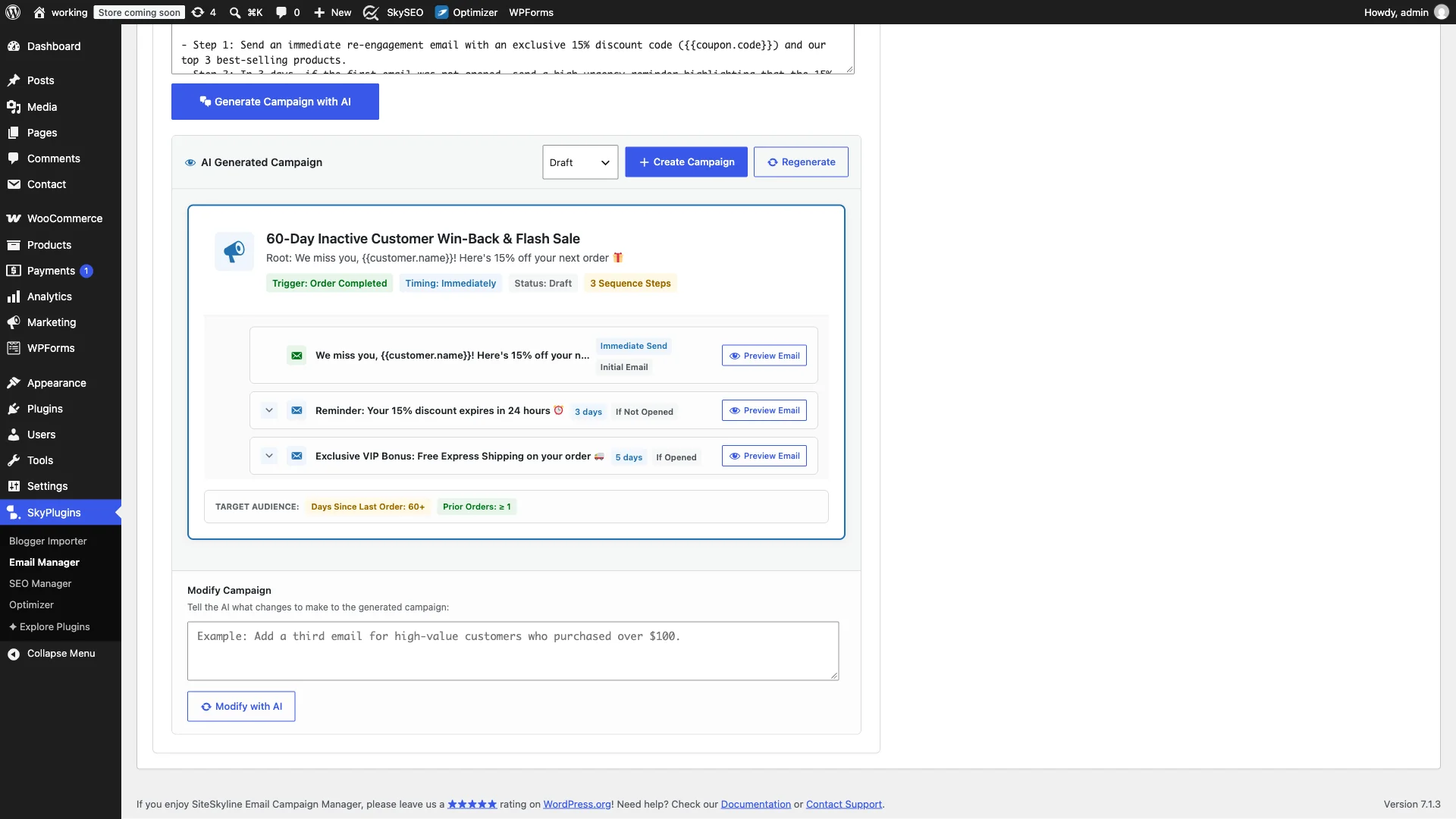
क्लिक करें Generate Campaign with AI button. Within seconds, the AI parses your instructions and builds a complete campaign blueprint. The visual preview card displays:
- Selected Event Trigger: Automatically mapped to
Order Completedwith inactivity filters. - Target Audience Rules: Configured for
days_since_last_order: 60and prior order minimums. - Sequential Branch Logic: Visual rows showing root triggers, unopened reminder branches, and opened VIP rewards.
- Emotionally Targeted Subject Lines: High-open hooks using emoji accents, curiosity gaps, and dynamic recipient names.
Step 4: Preview Generated Email Copy & Merge Tags
क्लिक करें Preview Email button next to any step in the sequence. A focused modal dialog opens displaying the complete HTML email body, headline structure, call-to-action buttons, and footer unsubscribe links.
Notice how the AI seamlessly weaves dynamic tokens like {{customer.name}}, {{coupon.code}}, और {{site.url}} into the copy, ensuring your emails read like handcrafted, personalized notes rather than mass blasts.

Step 5: Refine Tone & Constraints with the AI Assistant
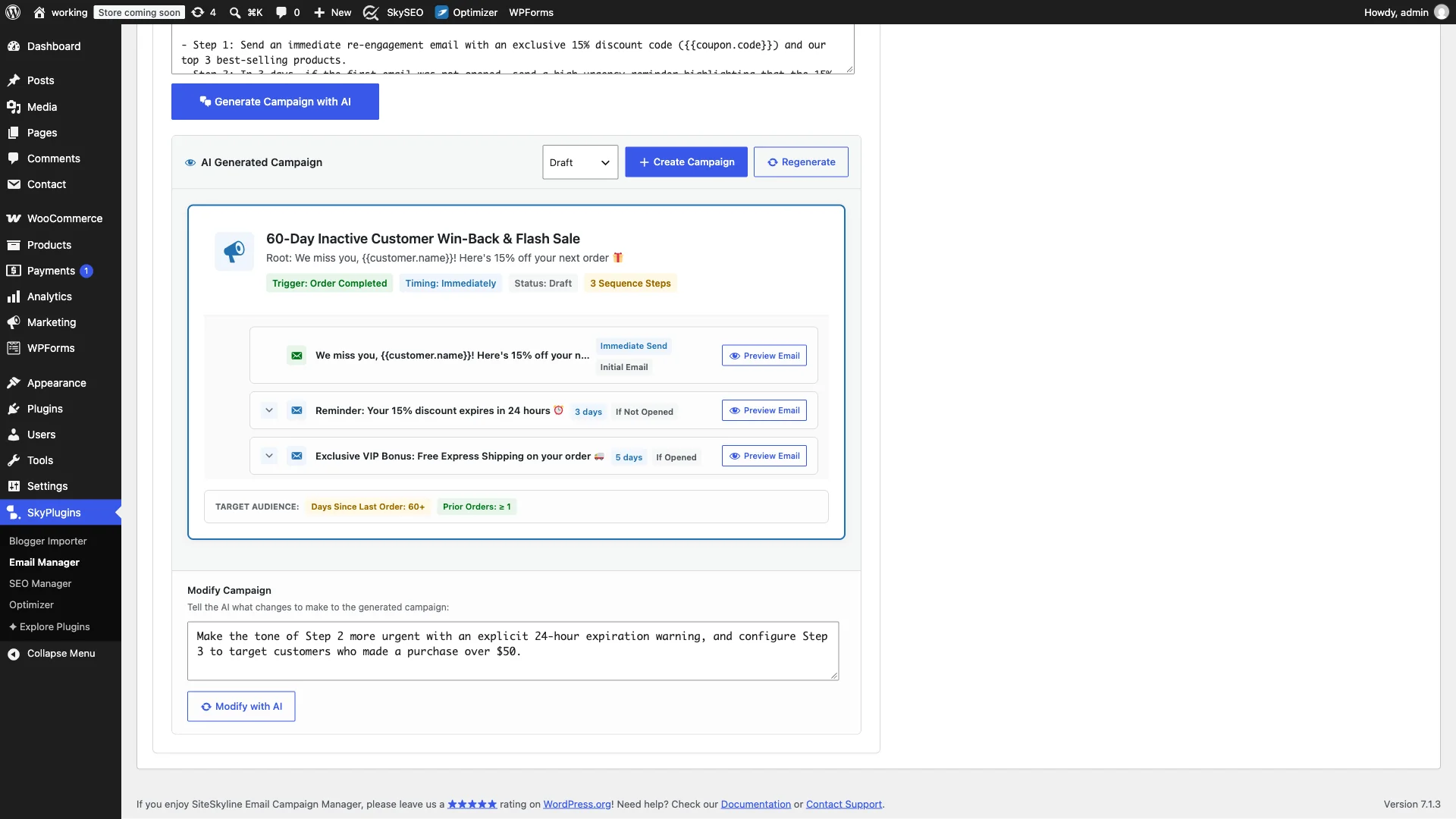
No campaign has to remain static. In the Modify Campaign feedback box below the preview, enter specific instructions to tune the output. You can instruct the AI to:
- “Heighten the urgency in Step 2 with an explicit 24-hour expiration warning.”
- “Make the brand tone friendlier and add a testimonial placeholder in Step 1.”
- “Add a condition requiring minimum prior spend of $100 for the VIP step.”
क्लिक Modify with AI, and SiteSkyline intelligently updates your sequence while preserving your approved elements.
Step 6: One-Click Campaign Creation & Deployment
When the campaign aligns with your marketing goals, choose whether to save it as Draft or set it to सक्रिय directly from the status dropdown. Click Create Campaign.
SiteSkyline instantly packages the AI blueprint into a native WordPress campaign record. All steps, timing triggers, audience filters, and HTML message templates are established in your database and ready to execute immediately.

5 Proven AI Prompts for WooCommerce Stores
Here are high-performing prompts you can paste directly into the AI Campaign Builder to drive immediate revenue:
- VIP Customer Appreciation: “Create a VIP loyalty sequence for customers who completed 3 or more orders. Send an immediate heartfelt thank-you with an exclusive 20% coupon, followed in 7 days by an invitation to our private beta testing group.”
- First-Time Buyer Onboarding: “Design a 4-step onboarding sequence for first-time purchasers. Step 1: Immediate order care guide. Step 2: 4 days later, product usage tips. Step 3: 10 days later, review request for a $10 credit. Step 4: 20 days later, replenishment recommendation.”
- Abandoned Cart Urgency Flow: “Create an aggressive 3-part abandoned cart recovery flow. Step 1: 1-hour gentle reminder. Step 2: 24-hour reminder with a 10% coupon code. Step 3: 48-hour final warning highlighting stock scarcity.”
- Category Cross-Sell: “Build an automated cross-sell campaign triggered when an order is completed. Wait 5 days, then recommend accessories and care kits matching their purchased items with free shipping.”
- Seasonal Holiday Flash Sale: “Generate a 48-hour flash sale broadcast for all subscribers. Lead with a bold 30% discount, follow up in 24 hours with top 5 customer picks, and send a final 4-hour countdown alert.”
अक्सर पूछे जाने वाले प्रश्न (FAQ)
Is the Gemini API free to use?
Google offers a generous free tier for Gemini API keys in Google AI Studio, covering standard marketing generation needs without credit card requirements. Paid pay-as-you-go tiers cost fractions of a penny per thousand words.
Can I edit the AI-generated emails in the visual drag-and-drop builder?
Yes! Once the AI creates the campaign, every email node is fully editable. You can open any step in the visual drag-and-drop builder to adjust styling, swap banners, add product grids, or customize fonts.
Does SiteSkyline send my customer data to the AI?
No. The AI is only used to generate the structural marketing logic, subject lines, and template copy. Private customer data, recipient names, emails, and transaction histories remain 100% self-hosted on your WordPress server and are never transmitted to external AI endpoints.
Supercharge Your Email Marketing with AI Today
Harness the creative power of artificial intelligence directly within your WordPress workflow. Upgrade to SiteSkyline Email Campaign Manager Pro to unlock the AI Campaign Builder and start launching revenue-generating email automations in minutes.