Do you want to add breadcrumb navigation and Google-compliant BreadcrumbList schema markup to your WordPress website? Breadcrumbs are not just helpful navigation aids for human visitors; they are also a crucial ranking signal. When properly structured with JSON-LD schema, Google replaces long, unreadable URLs in search results with clean, branded breadcrumb trails that dramatically boost your organic click-through rates (CTR).
In this comprehensive, step-by-step guide, we will show you how to enable BreadcrumbList schema, configure sitewide structured data, and display responsive visual breadcrumbs in WordPress using Sky SEO Manager.
Why Breadcrumbs & BreadcrumbList Schema Matter for SEO
Breadcrumbs are a trail of horizontal links typically positioned at the top of a post or page (e.g., Home » SEO Guides » On-Page SEO) indicating where the current page lives within your website’s overall taxonomy.
Implementing breadcrumbs provides major SEO and user experience advantages:
- Google Rich Snippet Display: Instead of showing
https://example.com/2026/10/21/post-slug/in Google search results, Google uses yourBreadcrumbListschema to render a clean, professional path:example.com > Guides > Post Slug. - Lower Bounce Rates & Better User Engagement: When visitors land on your site from search engines, breadcrumbs give them an instant path to explore parent categories without hitting the browser’s back button.
- Enhanced Internal Linking: Breadcrumb trails create structured internal links pointing up your category hierarchy, passing PageRank equity to parent silos and cornerstone hub pages.
Step 1: Enable BreadcrumbList Schema in Sky SEO Manager
Traditionally, setting up breadcrumb schema required editing complex theme files or installing bloated navigation plugins that slow down your website. With Sky SEO Manager, you can configure your entire schema architecture in a few clicks.
Vai su SkyPlugins » SEO Manager from your WordPress dashboard and click on the Schema tab, then select the Breadcrumbs sub-tab.
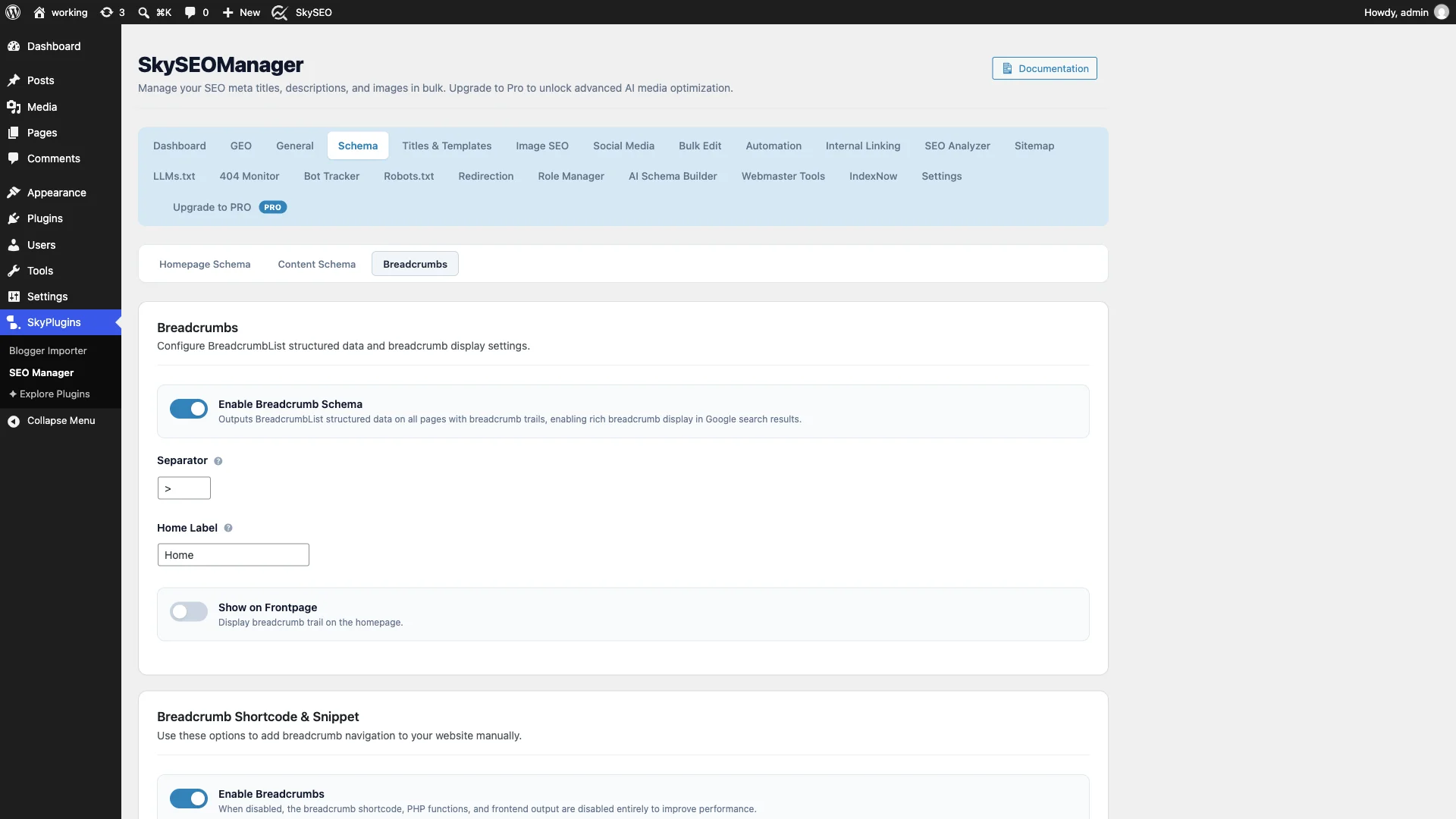
Here you can customize essential breadcrumb settings:
- Enable Breadcrumb Schema: Turn this toggle ON to automatically inject valid
BreadcrumbListJSON-LD structured data into the<head>of all your posts, pages, and taxonomy archives. - Separator: Choose your preferred breadcrumb separator symbol (e.g.,
>,»o/). - Home Label: Customize the anchor text for your root homepage (default is
Home). - Show on Frontpage: Choose whether the breadcrumb trail should appear on your static homepage.
- Enable Breadcrumbs: Keeps the frontend breadcrumb engine active so you can render visual breadcrumbs anywhere via shortcode or PHP snippets.
Step 2: Configure Global Content Schema Types
Breadcrumbs are just one part of a comprehensive schema strategy. To help search engines understand the exact type of content you publish across different post types, switch to the Content Schema sub-tab.
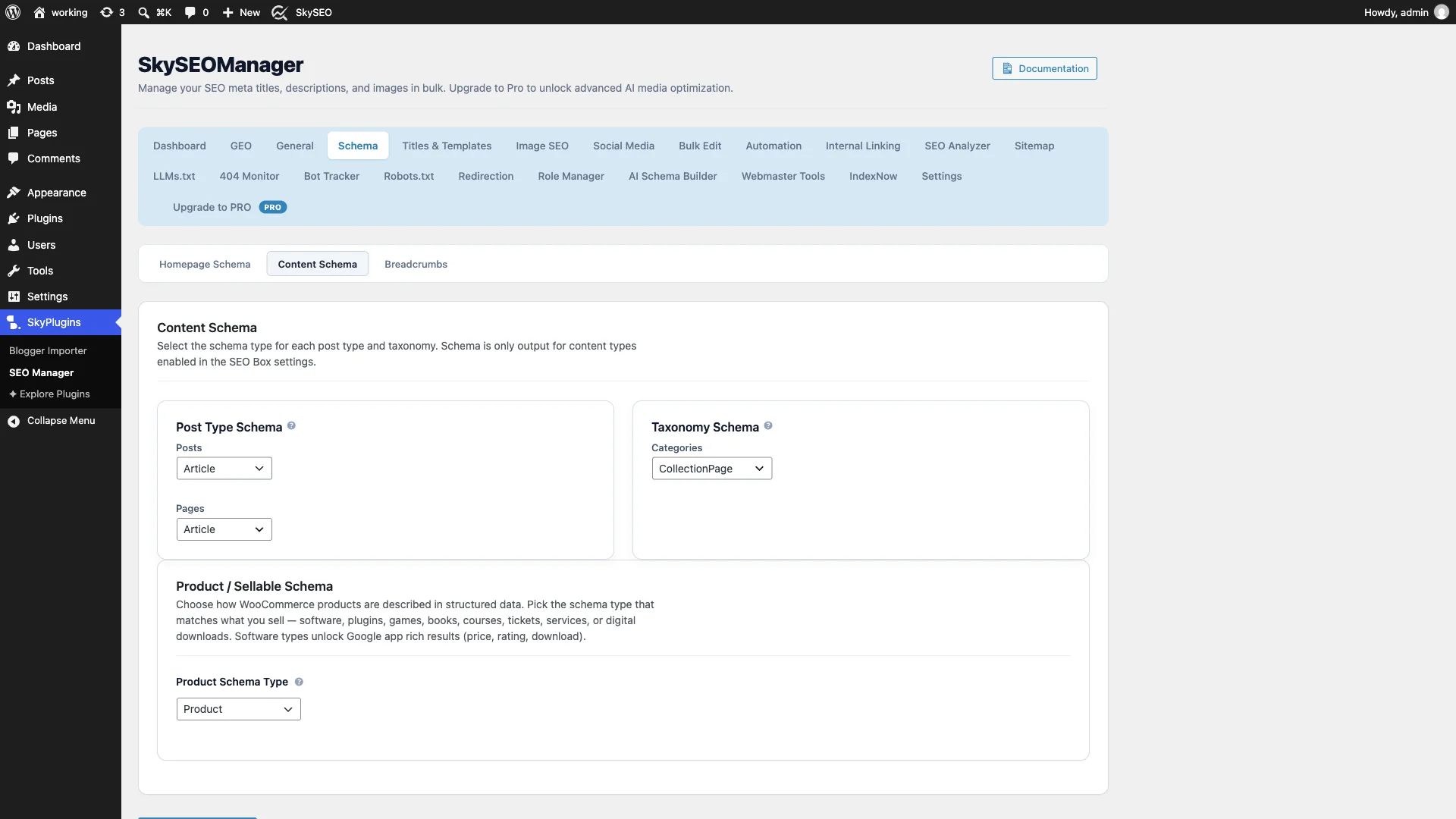
You can set default schema types tailored to your business model:
- Messaggi: Set to
Article,BlogPostingoNewsArticleto unlock Google Discover and Top Stories eligibility. - Pagine: Choose between standard
Article,WebPage, or specialized commercial schema. - Taxonomies: Assign
CollectionPageoItemListschema to category and tag archives. - Product / Sellable Schema: If you sell software, courses, plugins, or physical goods, select the exact product subtype (e.g.,
SoftwareApplication,CourseoProduct) to unlock rich pricing, rating, and download snippets in Google search.
Step 3: Set Up Homepage Organization Schema
To establish your brand entity in the Google Knowledge Graph, click on the Homepage Schema sub-tab.

Seleziona il tuo Homepage Schema Type (such as Organization, LocalBusinesso Person). Enter your official brand name and upload your company logo. This data establishes the overarching publisher entity that Google associates with your articles and breadcrumb paths.
Step 4: Customize Post-Level Schema in Gutenberg
What if a specific post contains a step-by-step tutorial, a software review, an FAQ section, or a recipe that requires specialized structured data?
Open any post in the WordPress block editor (Gutenberg). Click the SkySEO score button in the top toolbar to open the sidebar, then navigate to the Schema scheda.
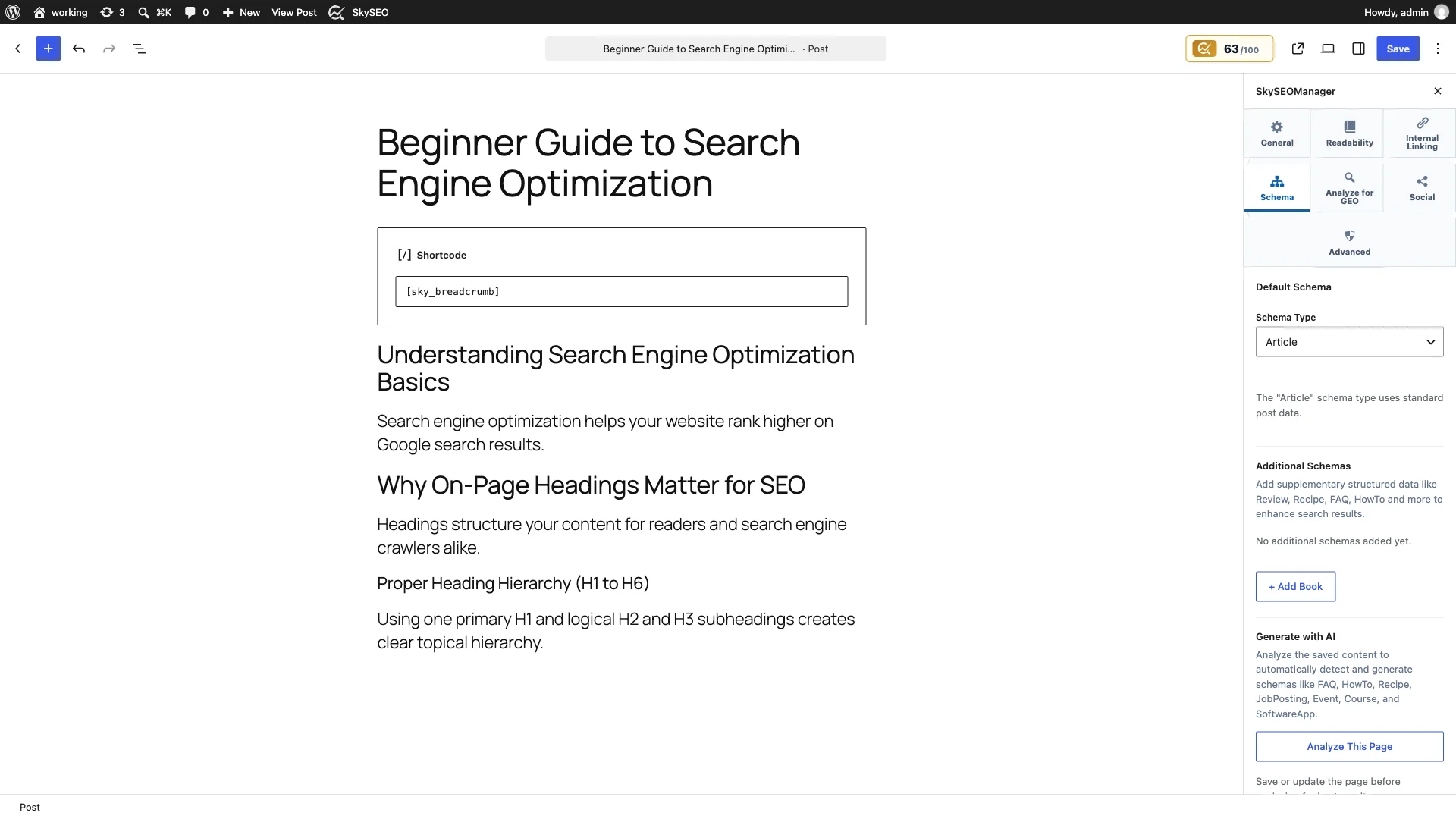
In this panel, you can override the default post schema or stack multiple supplementary schema types (like FAQ, HowTo, Reviewo Recipe) to capture multiple Google rich result badges simultaneously.
Step 5: Display Visual Breadcrumbs Using Shortcode or PHP
While search engine crawlers read your BreadcrumbList schema in the background, your human readers benefit immensely from seeing visual breadcrumb navigation at the top of your content.
In the WordPress block editor, add a Codice breve block at the top of your post and insert:
[[sky_breadcrumb]]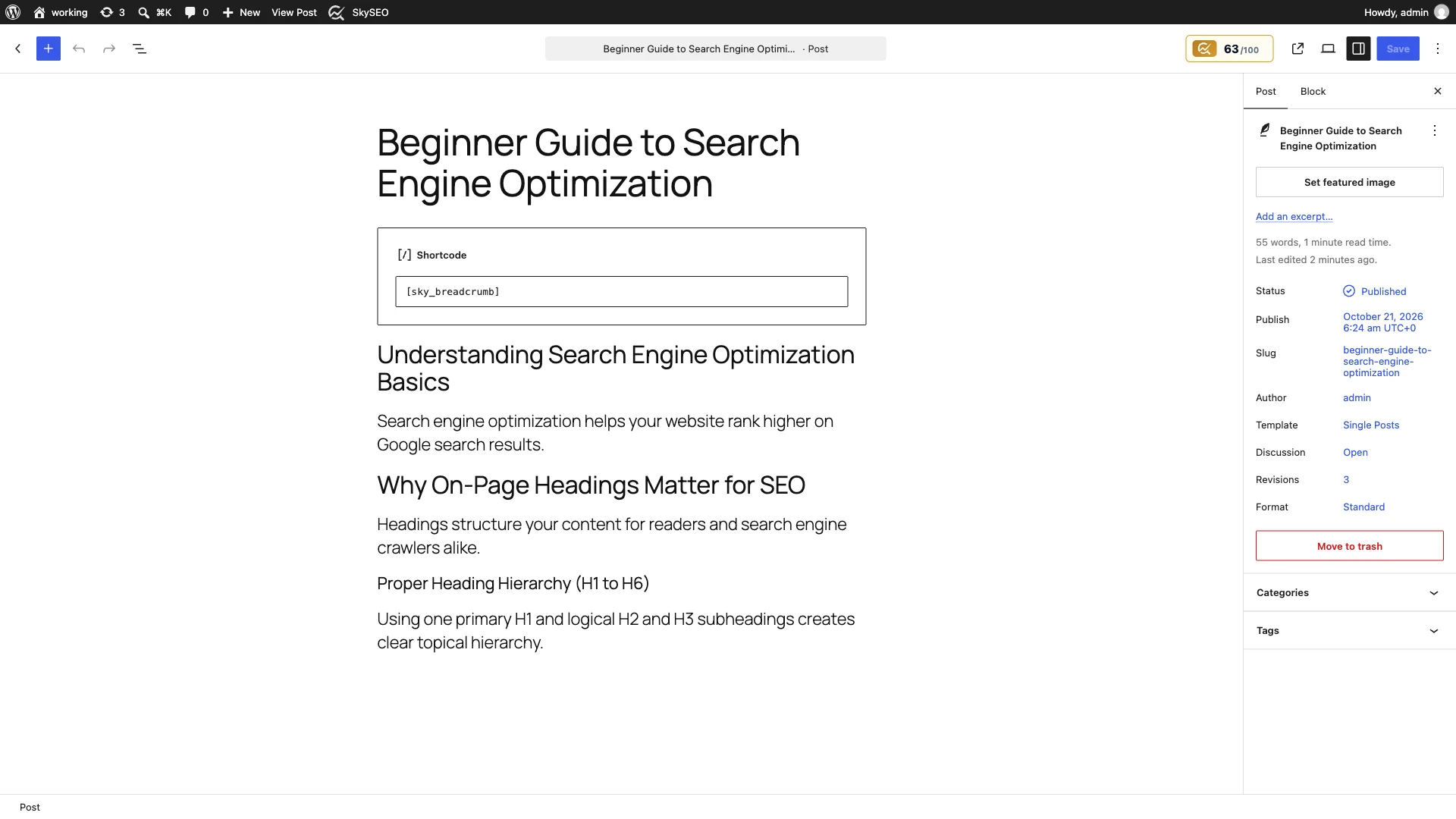
If you prefer to display breadcrumbs automatically across all posts and pages, you can add this one-line PHP snippet into your theme’s header.php o single.php template:
<?php if (function_exists('sky_breadcrumb')) sky_breadcrumb(); ?>Step 6: Test & Validate Live Breadcrumbs and JSON-LD
Now visit your published post on the front end to verify both the visual breadcrumb trail and the structured data output.
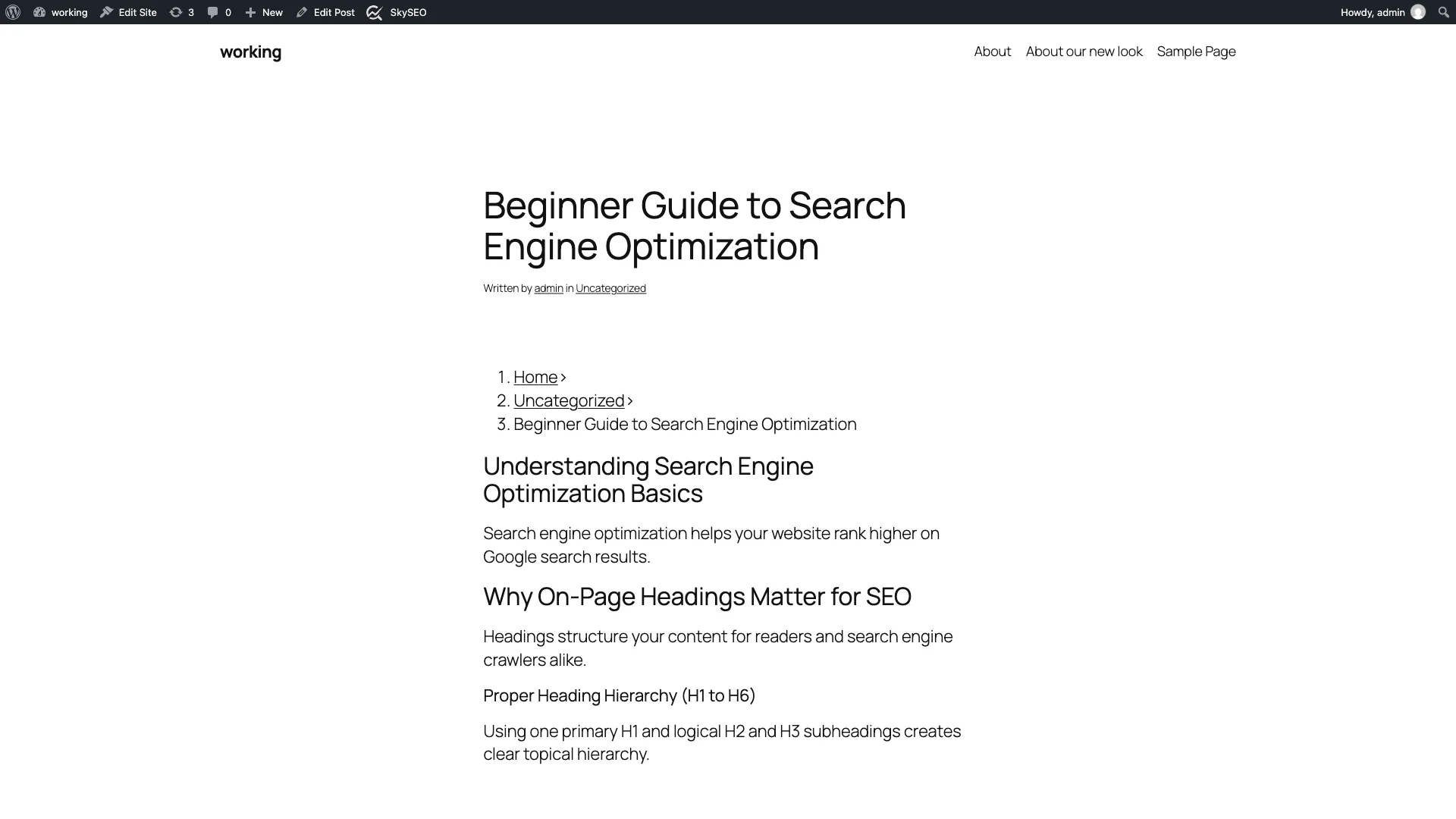
If you inspect the page source, you will see clean, minified JSON-LD schema generated automatically by Sky SEO Manager:
<script type="application/ld+json">
{
  "@context": "https://schema.org",
  "@type": "BreadcrumbList",
  "itemListElement": [
    {
      "@type": "ListItem",
      "position": 1,
      "name": "Home",
      "item": "https://example.com/"
    },
    {
      "@type": "ListItem",
      "position": 2,
      "name": "Guides",
      "item": "https://example.com/category/guides/"
    },
    {
      "@type": "ListItem",
      "position": 3,
      "name": "How to Add Schema and Breadcrumbs",
      "item": "https://example.com/how-to-add-schema-and-breadcrumbs/"
    }
  ]
}
</script>
You can test this URL using Google’s free Rich Results Test tool. Google will detect the BreadcrumbList E Article items with zero errors, validating your site for enhanced search snippets.
Visual Breadcrumbs vs. BreadcrumbList Schema Comparison
Here is a quick breakdown of how visual navigation and structured data work in tandem:
| Caratteristica | Visual Breadcrumb Trail | BreadcrumbList Schema (JSON-LD) |
|---|---|---|
| Target Audience | Human site visitors | Google, Bing & search engine crawlers |
| Primary Benefit | Intuitive site navigation, reduced bounce rates | Rich breadcrumb paths in Google search results |
| Posizionamento | Visible HTML at top of post/page | Invisibile <script> in HTML <head> |
| Implementation | Codice breve [[sky_breadcrumb]] or PHP snippet | Automatic toggle in Sky SEO Manager |
| Mobile Friendly | Responsive text trail with CSS styling | Standardized JSON-LD format across devices |
Frequently Asked Questions (FAQs)
Can I use BreadcrumbList schema without displaying visual breadcrumbs?
Yes. In Sky SEO Manager, the Enable Breadcrumb Schema toggle operates independently of visual output. If your theme design doesn’t have space for visual breadcrumb links, you can still output 100% valid BreadcrumbList schema to secure Google rich snippet paths.
Will adding breadcrumb schema slow down my WordPress site?
No. Sky SEO Manager uses lightweight, non-blocking JSON-LD scripts that add less than 1KB of plain text to your HTML payload. It requires zero external database queries or render-blocking CSS/JavaScript files.
How long does it take for breadcrumb rich snippets to show on Google?
Once you implement BreadcrumbList schema and submit your XML sitemap via Google Search Console (or ping search engines instantly with IndexNow), Google typically updates your search snippet within several days to two weeks.
Final Thoughts & Next Steps
Adding structured data and intuitive breadcrumb navigation is one of the highest-ROI technical SEO upgrades you can make to your WordPress website. It boosts click-through rates from search results, improves crawl efficiency, and makes your site effortless to navigate.
For more technical WordPress optimization tutorials, be sure to read our companion guides on How to Edit Robots.txt and Manage Meta Robots E How to Track Search Engine Bots and Block Malicious Crawlers.