
Are you searching for the best WPML alternatives to build a multilingual WordPress website without slowing down your server with massive database tables or paying steep annual subscription renewals?
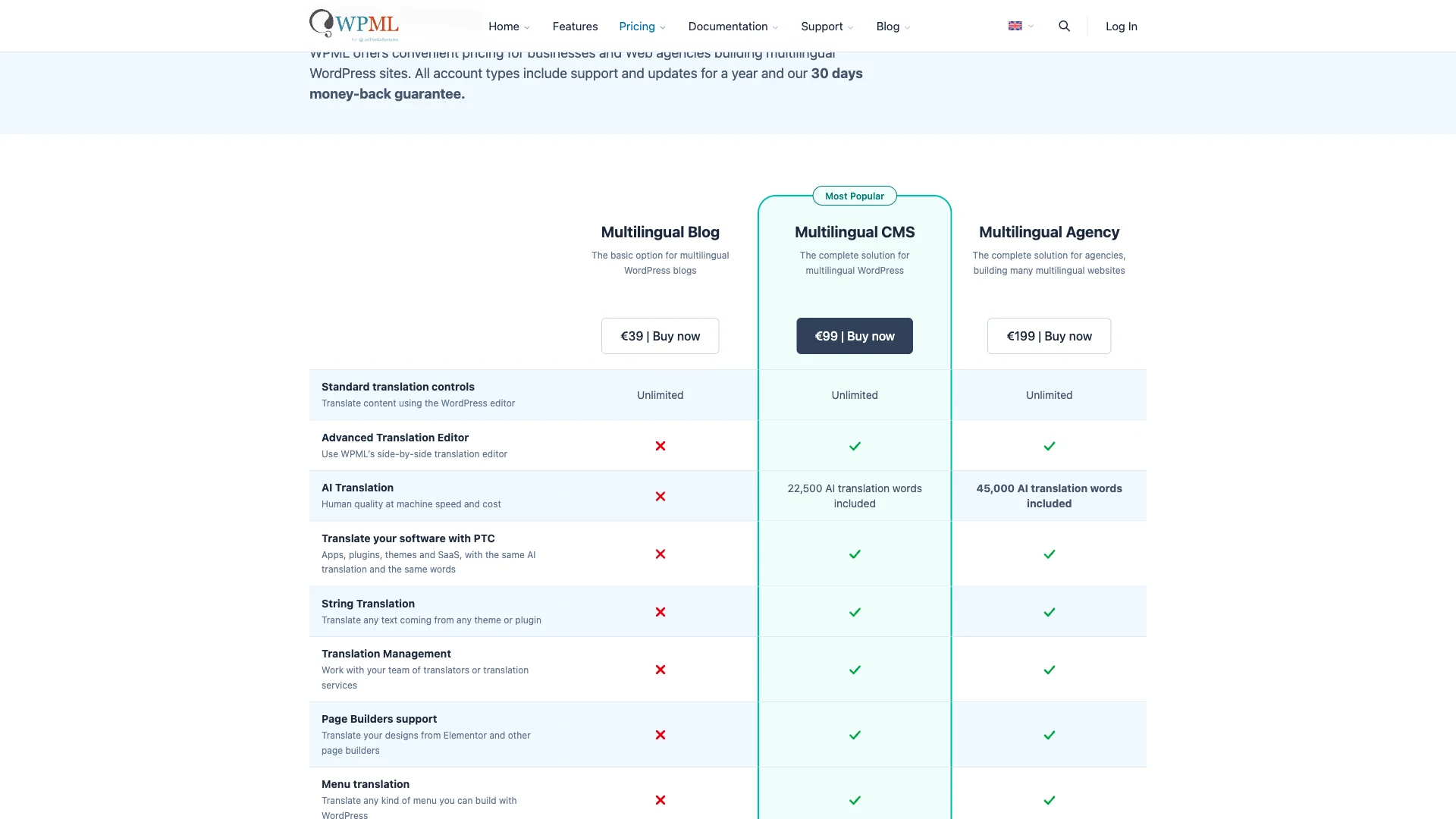
For years, WPML (WordPress Multilingual) was considered the standard choice for international sites. However, with Multilingual CMS plans costing $99 per year and separate fees for automatic translation credits, many store owners and publishers are looking for faster, cleaner solutions.
More critically, WPML is notorious for database overhead. By creating duplicate database rows for every translated post and executing dozens of string queries on every page request, it can severely degrade Time to First Byte (TTFB) and Core Web Vitals.
In this guide, we review and compare the 5 best WPML alternatives for WordPress in 2026—evaluating speed benchmarks, translation workflows, WooCommerce integration, and verified pricing.
Quick Summary: Top WPML Alternatives Compared
| Plugin / Solution | Pricing Model | Database Impact | Automated Translation | 最佳用途 |
|---|---|---|---|---|
| SiteSkyline SkyLang (with Polylang) | Free Core / Lifetime Options | Ultra-lightweight | Yes (Google Translate, DeepL & AI) | Fastest overall performance, zero recurring fees & bulk automated translation |
| WPML | $99 to $199 / year + credits | Heavy (Multiple SQL tables & duplicates) | Yes (Paid credits) | Legacy enterprise corporate sites already heavily invested in WPML architecture |
| 翻译出版社 | Free / €99 to €199/year | Moderate (Stores string tables) | Yes (Google Translate / DeepL API) | Visual front-end inline translation editing |
| Polylang (Standalone) | Free / €99/year Pro | Ultra-lightweight | No (Manual entry only) | Publishers who hire human translators and do not need automatic machine translation |
| Weglot | SaaS (€15 to €79+/month) | Zero on DB (Cloud-hosted) | Yes (Automated cloud engine) | High-budget brands wanting fully managed cloud translation hosting |
Why Website Owners Are Replacing WPML
While WPML has powered international websites since 2007, modern WordPress performance standards have exposed several significant drawbacks:
- Database Bloat & Slow Query Execution: WPML creates dedicated database tables (including
wp_icl_translations,wp_icl_strings, 和wp_icl_translation_status). On large stores, these tables quickly swell to hundreds of thousands of rows, slowing down standard WordPress SQL queries. - Duplicate Post Rows: For every language added, WPML duplicates post and product entries in your
wp_poststable, multiplying database storage and search query complexity. - Mandatory Recurring Costs: The Multilingual CMS plan costs $99 annually for only 3 sites. Furthermore, automatic machine translation requires purchasing additional credit packages ($2 to $17/month), causing unexpected monthly expenses.
- Difficult Plugin Uninstallation: Deactivating WPML often leaves orphaned tables, corrupted permalinks, and lingering string metadata that requires technical database cleaning to remove.
1. SiteSkyline SkyLang Auto Translator: Best Free & Lightweight Alternative
If you want the speed of a clean, lightweight architecture combined with one-click automated translation, SiteSkyline SkyLang Auto Translator (paired with Polylang) is the premier solution.
Polylang is widely recognized as the fastest multilingual plugin for WordPress because it leverages native taxonomies rather than heavy custom string tables. SkyLang bridges Polylang’s biggest limitation—the lack of automated translation—by adding powerful bulk translation engines directly inside your WordPress admin.

Standout Capabilities & Advantages:
- Zero Database Overhead: Operates seamlessly on top of Polylang’s lightweight taxonomy architecture, preventing database bloat and maintaining rapid TTFB.
- One-Click Bulk Translation Editor: Select posts, pages, or WooCommerce products, choose target languages, and automatically generate translated content across your entire site in seconds.
- Flexible Multi-Engine Support: Translate content using free built-in Google Translate tools, or connect your own DeepL API or OpenAI API keys for nuanced, high-accuracy localized copy.
- Automatic Translate on Publish: Whenever you publish or update a new post in your primary language, SkyLang automatically generates and syncs the translated editions.
- Full WooCommerce Product Translation: Automatically translates product titles, descriptions, categories, and attributes without requiring costly $99/year e-commerce add-ons.
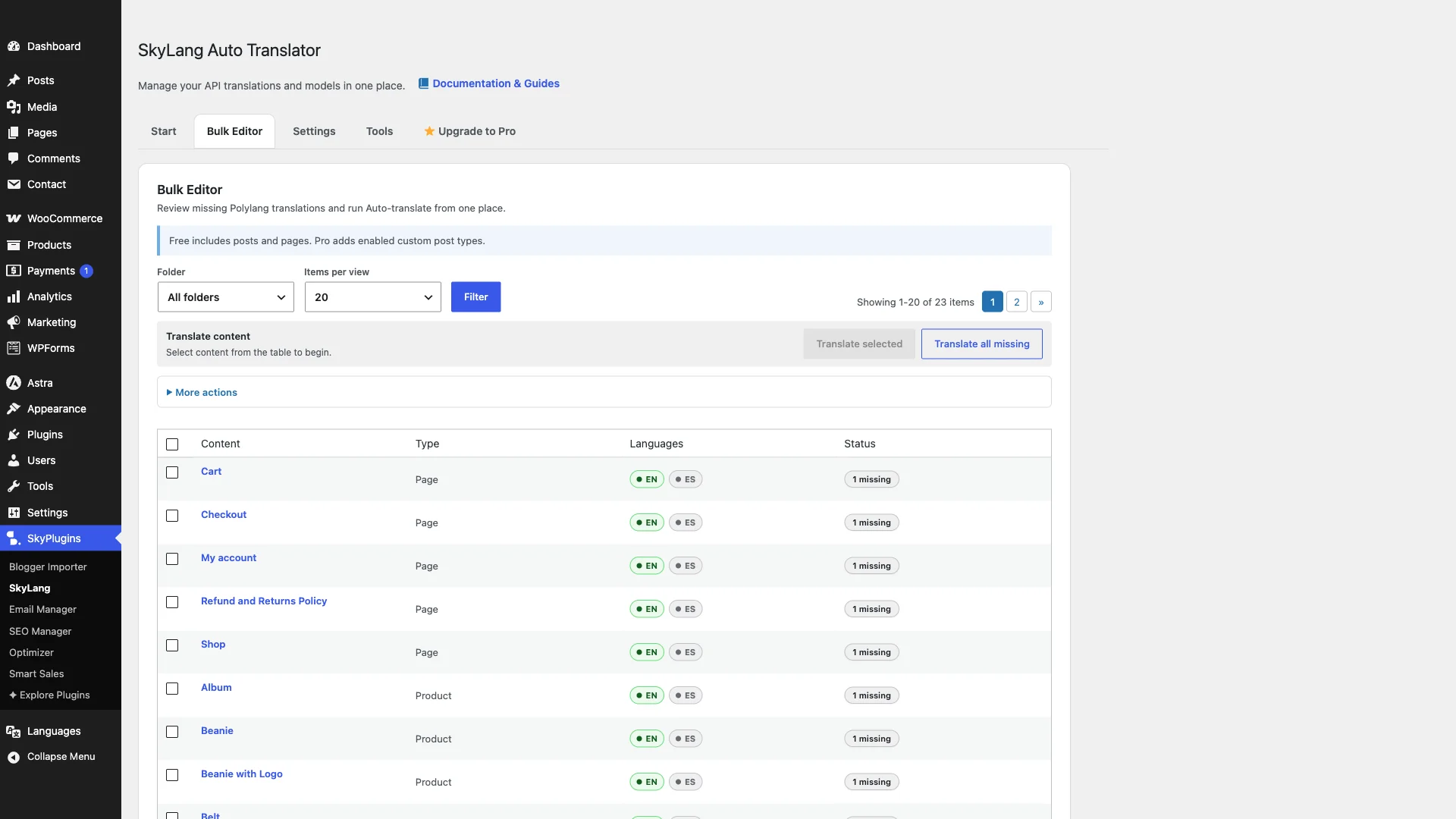

Verdict: The most efficient, high-performance WPML alternative available. You get complete automated translation and WooCommerce compatibility without bloated database queries or annual subscription lock-in.
2. TranslatePress: Best for Visual Front-End Editing
TranslatePress takes a unique approach to WordPress translation by allowing website owners to translate their content directly through a visual, front-end visual editor.

Pros:
- Intuitive visual point-and-click editor: click any text on the page to change its translation.
- Translates dynamic gettext strings, forms, and page builder elements without complex string searches.
- Compatible with WooCommerce, Elementor, and Divi out of the box.
Cons:
- Restrictive Free Tier: The free version limits you to only one target language.
- Steep Annual Licensing: Unlocking unlimited languages and SEO metadata translation (URL slugs, page titles, and meta descriptions) requires the Personal (€99/year) or Business (€199/year) plan.
- Stores translated strings in custom database tables that can grow large on content-heavy websites.
Verdict: Ideal for visual designers who want to tweak translations on the front-end, provided your budget accommodates €99 to €199 annual renewal fees.
3. Polylang (Standalone): Best for Manual Human Translations
Polylang is one of the most widely adopted multilingual plugins in the WordPress repository, renowned for its clean code and fast performance.

Pros:
- Completely free core version supporting unlimited languages.
- Lightweight footprint that relies on native WordPress taxonomies rather than heavy custom tables.
- Zero server performance penalty on high-traffic websites.
Cons:
- No Automated Machine Translation: The free plugin provides zero automated translation; you must write or paste every translated sentence manually.
- WooCommerce compatibility requires the paid Polylang for WooCommerce extension (€99/year).
- Polylang Pro costs €99/year to unlock URL slug translation and REST API support.
Verdict: Excellent if you employ a dedicated team of human translators. For automated translation, pairing free Polylang with SkyLang Auto Translator delivers maximum value.
4. Weglot: Best for Hands-Off Cloud Translation
Weglot is a cloud-based Software-as-a-Service (SaaS) platform that automates website translation through a lightweight JavaScript integration.
Pros:
- Setup takes less than five minutes with automatic detection of all website content.
- Zero impact on your WordPress database because translations are stored on Weglot’s cloud servers.
- Clean dashboard with collaboration tools for professional translation agencies.
Cons:
- Escalating Monthly Subscription Costs: The Starter plan costs €15/month ($160/year) and is capped at only 10,000 words. Mid-sized stores quickly require the Business (€29/month) or Pro (€79/month) plans, costing up to $850+ annually.
- Third-Party Data Dependency: If you cancel your subscription, your translated pages disappear immediately since the content resides on Weglot servers rather than your WordPress database.
Verdict: Convenient for enterprise brands with large recurring budgets, but financially impractical for small businesses and content-heavy publishers.
5. GTranslate: Best for Quick Budget Widget Translations
GTranslate utilizes Google Translate to provide fast, automated on-the-fly language switching for WordPress sites.
Pros:
- Free version requires zero manual translation work.
- Instantly supports over 100 languages via a simple drop-down switcher widget.
- Very low server resource usage.
Cons:
- Free version does not create separate indexable URLs for translated languages, providing zero multilingual SEO benefit.
- Search engine indexing and URL slug translation require the paid plan starting at $9.99 to $39.99 per month.
- Translation quality in the basic tier cannot be manually edited or corrected.
Verdict: Suitable for personal blogs that only need an informal translation widget, but insufficient for stores seeking international search rankings.
Feature Comparison: WPML vs. Top Alternatives
| 特征 | SkyLang + Polylang | WPML CMS | TranslatePress Pro | Weglot |
|---|---|---|---|---|
| Annual License Cost | Free Core / Lifetime | $99 / year + credits | €99 – €199 / year | $160 – $850+ / year |
| Database Architecture | Native Taxonomies (Fast) | Heavy Custom Tables | Custom String Tables | Cloud-Hosted (SaaS) |
| Automated Bulk Translation | Included | Paid credits required | API key required | Included (Word-capped) |
| Supported Engines | Google, DeepL & AI | DeepL, Google, Azure | Google, DeepL | Proprietary Cloud |
| WooCommerce兼容性 | Included | Included | Included in Pro | Included |
| Content Ownership | 100% On-Site | 100% On-Site | 100% On-Site | Third-Party SaaS |
| Multilingual SEO Indexing | Yes (Dedicated URLs) | 是的 | Yes (Pro version) | Yes (Paid version) |
How to Choose the Right WPML Alternative
Selecting the best multilingual solution depends on your store’s performance requirements, editorial workflow, and ongoing budget:
- Choose SiteSkyline SkyLang with Polylang if you want maximum page speed, automated bulk translations using Google or DeepL, and complete data ownership with zero recurring annual software fees.
- Choose TranslatePress if you prioritize visual front-end point-and-click editing and have a budget for their €99/year license.
- Choose Polylang Standalone if you already work with professional human translators and have no need for automated machine translation.
- Choose Weglot if you run an enterprise company where hands-off cloud hosting justifies recurring fees of $300 to $800+ per year.
常见问题 (FAQ)
Why does WPML slow down WordPress?
WPML creates multiple custom database tables (such as wp_icl_strings 和 wp_icl_translations) and duplicates post entries for every language. On content-rich sites, this significantly increases database query volume and memory usage on every page load, causing higher Time to First Byte (TTFB).
Can I automatically translate WordPress for free?
Yes. Pairing the free Polylang plugin with SiteSkyline SkyLang Auto Translator allows you to automatically translate posts, pages, and WooCommerce products using free built-in Google Translate tools without paying for machine translation credits or expensive pro licenses.
Is Polylang faster than WPML?
Yes. Polylang uses native WordPress taxonomy relationships to link translated content rather than querying heavy custom string tables. Benchmark tests consistently show Polylang requires fewer database queries and executes faster than WPML under heavy traffic.
What is the difference between client-side and server-side translation?
Client-side translation (like free GTranslate widgets) translates text in the visitor’s browser on the fly, creating no indexable URLs for Google. Server-side translation (like SkyLang, Polylang, and WPML) creates static, indexable URLs (e.g., yoursite.com/es/) with dedicated meta tags, allowing your translated pages to rank on international search engines.
Do I lose my translations if I deactivate a multilingual plugin?
With self-hosted plugins like SkyLang, Polylang, and WPML, all translated content is saved directly in your WordPress database and remains intact. With SaaS services like Weglot, translations are hosted externally in the cloud and disappear if your subscription is terminated.