Does your WordPress website fail Google PageSpeed Insights with the warning: “Eliminate render-blocking resources”? When visitors open your website on mobile devices, their browser pauses rendering the entire screen until all external stylesheets are completely downloaded, parsed, and executed. This creates a noticeable blank white screen delay, frustrating users and driving your bounce rate through the roof.
To fix this bottleneck and achieve sub-second First Contentful Paint (FCP) times, you must implement Critical CSS. Critical CSS extracts the bare minimum styling required to display above-the-fold content and inlines it directly into your HTML document, while loading the rest of your theme and plugin stylesheets asynchronously in the background.
In the past, generating Critical CSS required paid external APIs, complicated Node.js build scripts, or cloud SaaS services that charged per-pageview fees. In this step-by-step tutorial, we will show you how to eliminate render-blocking CSS in WordPress using SOptimizer with 100% free, in-browser Critical CSS generation.
What Is Render-Blocking CSS & Why Does It Slow Down WordPress?
When a web browser requests a page, it constructs the DOM (Document Object Model) and CSSOM (CSS Object Model) before it can paint the first pixel to the screen. Standard WordPress installations enqueue half a dozen external stylesheets in the <head>:
- WordPress Block Library CSS (
wp-block-library.css) - Active WordPress Theme CSS (
style.css) - WooCommerce Core CSS (
woocommerce.css) - Page Builder Stylesheets (Elementor, Divi, Beaver Builder)
- Form Plugin & Slider Stylesheets
Because stylesheets are render-blocking by default, the browser will not show anything until every single stylesheet has downloaded over the network. On 4G or 5G mobile connections, this delay can easily exceed 2 to 3 seconds.
Comparison: Traditional CSS Loading vs. SOptimizer Critical CSS
Here is what happens inside a visitor’s mobile browser with and without Critical CSS:
| Performance Metric | Traditional WordPress (Render-Blocking) | With SOptimizer Critical CSS |
|---|---|---|
| First Contentful Paint (FCP) | 2.4s to 4.5s (delayed by network requests) | 0.4s to 0.7s (instant above-the-fold render) |
| Above-The-Fold Styles | Blocked inside external CSS files | Inlined directly inside <style id="siskopfowo-critical-css"> |
| Full Stylesheets Delivery | Synchronous blocking <link rel="stylesheet"> |
Asynchronous non-blocking media="print" onload="this.media='all'" |
| Kritische CSS-Generierung | Paid third-party cloud servers with monthly limits | 100% Free, local in-browser generator with unlimited pages |
| Mobile PageSpeed Score | Typically 45–65 / 100 | 95–100 / 100 |
Step 1: Access the CSS Optimization Settings in SOptimizer
To begin configuring Critical CSS, log in to your WordPress admin dashboard and click on Optimizer in the sidebar. Next, click on the CSS tab in the navigation menu.
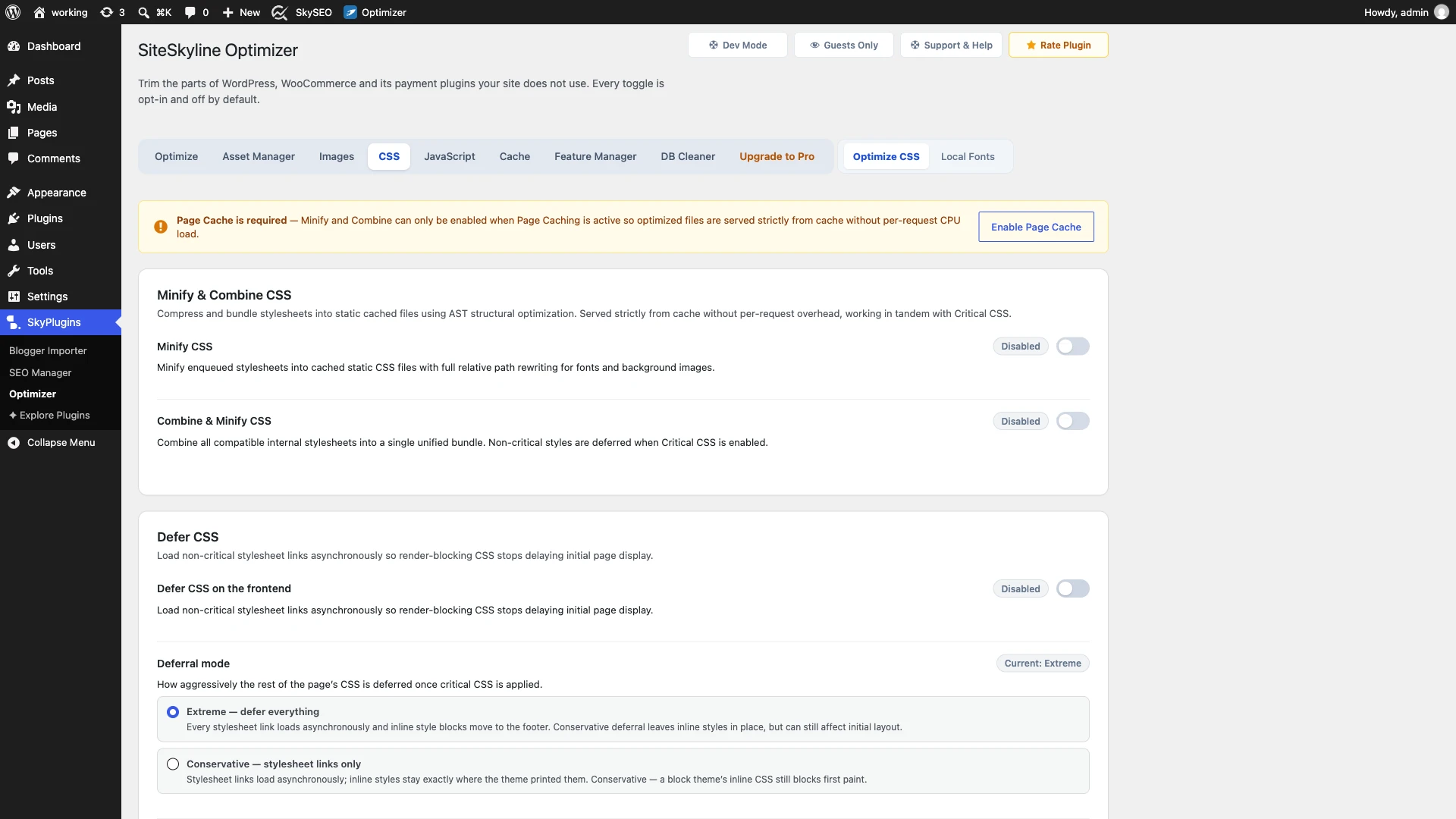
The CSS panel gives you access to three interconnected performance layers:
- Minify & Combine CSS: Uses AST structural optimization to compress stylesheet code and rewrite relative font/image paths.
- Defer CSS: Converts external blocking stylesheet links into asynchronous background loaders.
- Critical CSS: Automatically extracts and inlines above-the-fold rules for each post type.
Step 2: Enable CSS Deferral & Choose Your Deferral Mode
To stop external stylesheets from stalling your page display, scroll down to the Defer CSS Abschnitt.
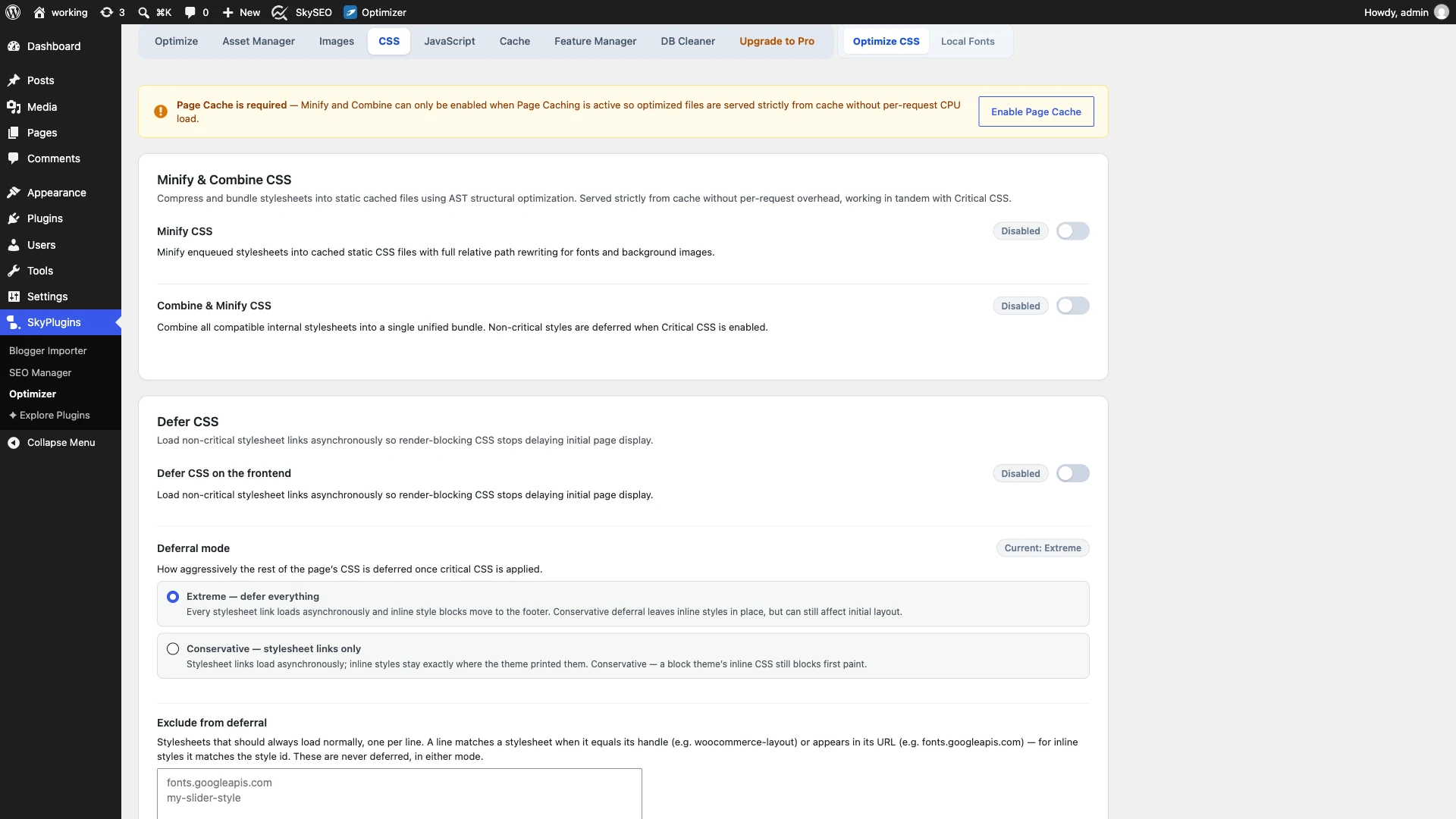
- Umschalten Defer CSS on the frontend Zu Ermöglicht.
- Wählen Sie Ihr aus Deferral mode:
- Extreme — defer everything (Recommended): Every stylesheet link loads asynchronously and inline style blocks move to the footer. This maximizes mobile PageSpeed scores.
- Conservative — stylesheet links only: Defers external stylesheet links while leaving inline styles where the theme printed them. Use this if your theme prints inline grid layouts that flash on load.
- Exclude from deferral (Optional): If an essential font or icon stylesheet must load synchronously, enter its script handle or URL (e.g.,
woocommerce-layoutoderfonts.googleapis.com) into the exclusion box.
Step 3: Generate Above-the-Fold Critical CSS in Your Browser
Unlike other plugins that send your CSS to third-party servers or require API tokens, SOptimizer generates Critical CSS directly inside your browser. No CSS ever leaves your server, and there are zero pageview limits.
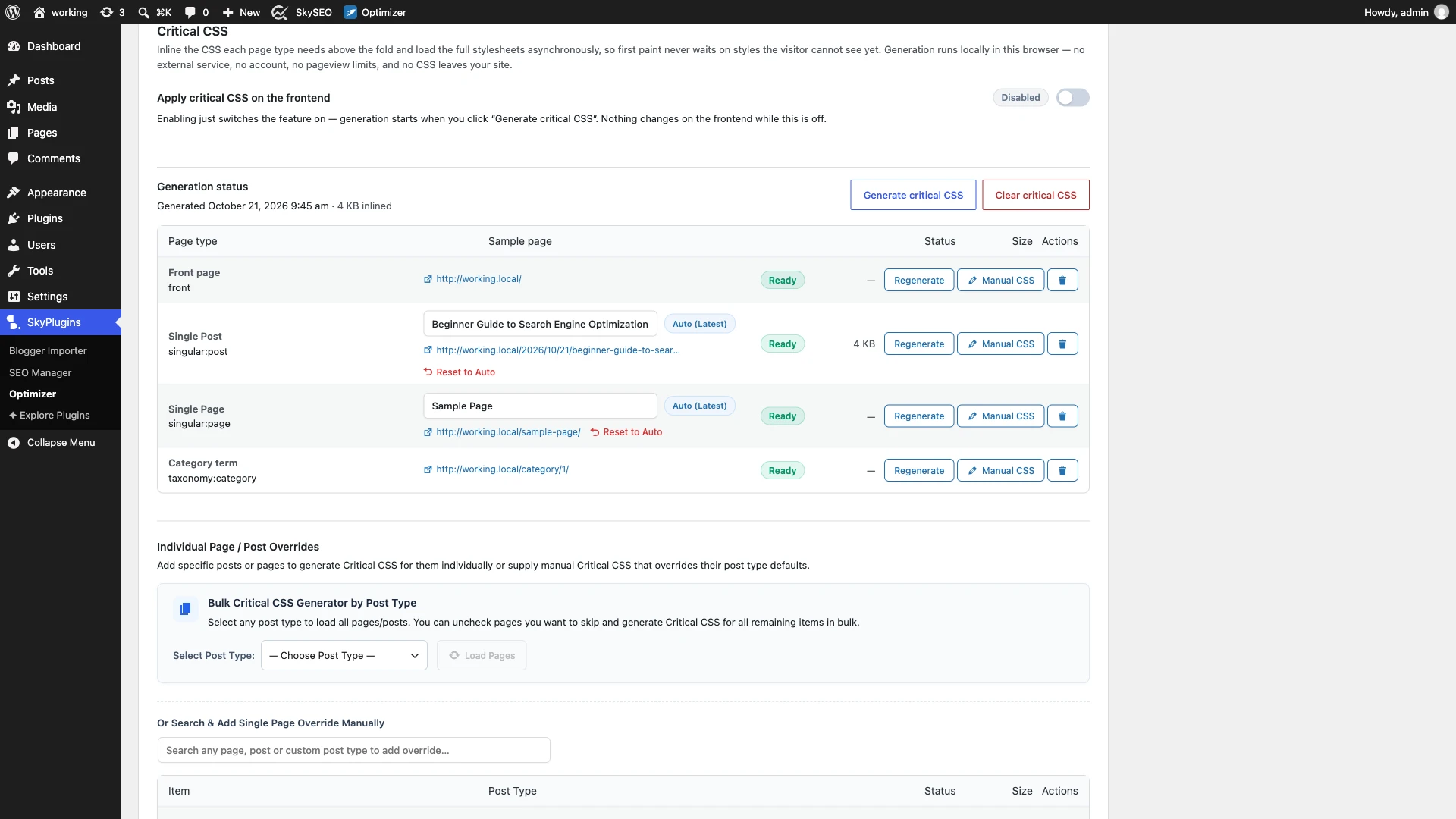
- Umschalten Apply critical CSS on the frontend Zu Ermöglicht.
- Klicken Sie auf das Blau Generate critical CSS Taste.
- The generator opens background worker iframes to analyze the above-the-fold viewport for your key templates:
- Front page: Your homepage layout.
- Single Post: Blog posts and news articles (e.g.,
singular:post). - Single Page: Static landing pages (e.g.,
singular:page). - Category term: Category and taxonomy archives (e.g.,
taxonomy:category).
Within seconds, the status will switch to a green Ready tag displaying the exact size of the generated Critical CSS (typically between 3 KB and 6 KB).
Step 4: Configure Bulk Generation for Custom Post Types
If your website has specialized landing pages, WooCommerce product archives, or custom post types, you can generate Critical CSS for all of them at once.
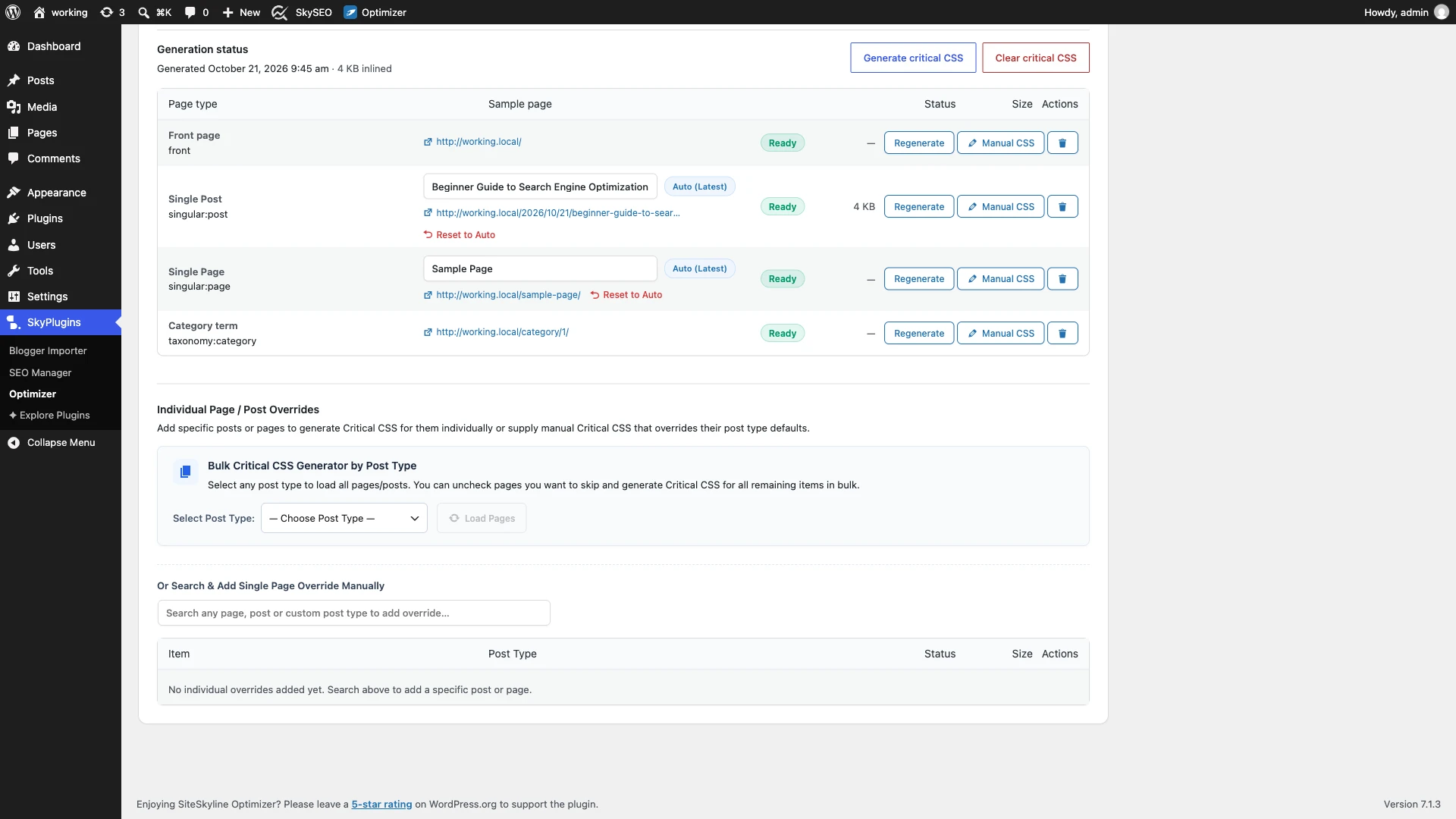
Unter dem Bulk Critical CSS Generator by Post Type section:
- Select your post type from the dropdown (e.g., Posts (52) oder Pages (3)).
- Klicken Load Pages to list all entries.
- Uncheck any pages you wish to skip, and click Generate Critical CSS for Selected Pages. The system processes the list in server-safe background batches.
Step 5: Inspect Styles with the Manual Critical CSS Editor
Need to override specific styles, tweak an above-the-fold navigation button, or fix a stubborn flash of unstyled content? SOptimizer gives you complete code-level control.
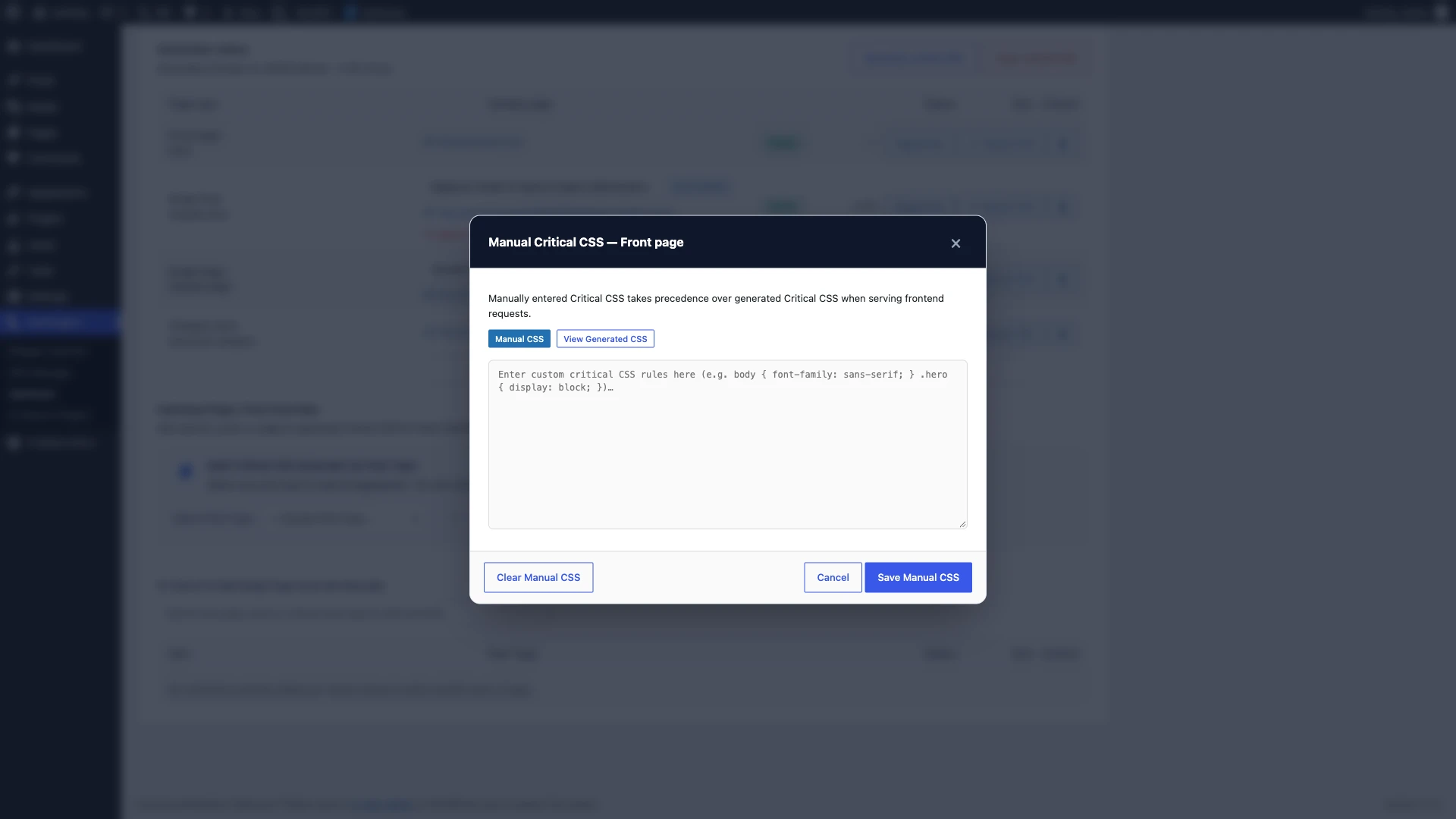
Klicken Sie auf Manual CSS button beside any template row to open the editor:
- View Generated CSS: Inspect the exact CSS rules extracted by the automated engine.
- Copy to Manual Editor: Copy the rules into the manual pane with a single click to add custom styling.
- Save Manual CSS: Manually entered Critical CSS takes immediate priority over automated rules on the frontend.
Step 6: Verify Live Frontend Source & Benchmark Speed
To confirm that your stylesheets are loading asynchronously and that render-blocking resources are gone, visit your live site and view page source (Ctrl+U oder Cmd+Option+U).
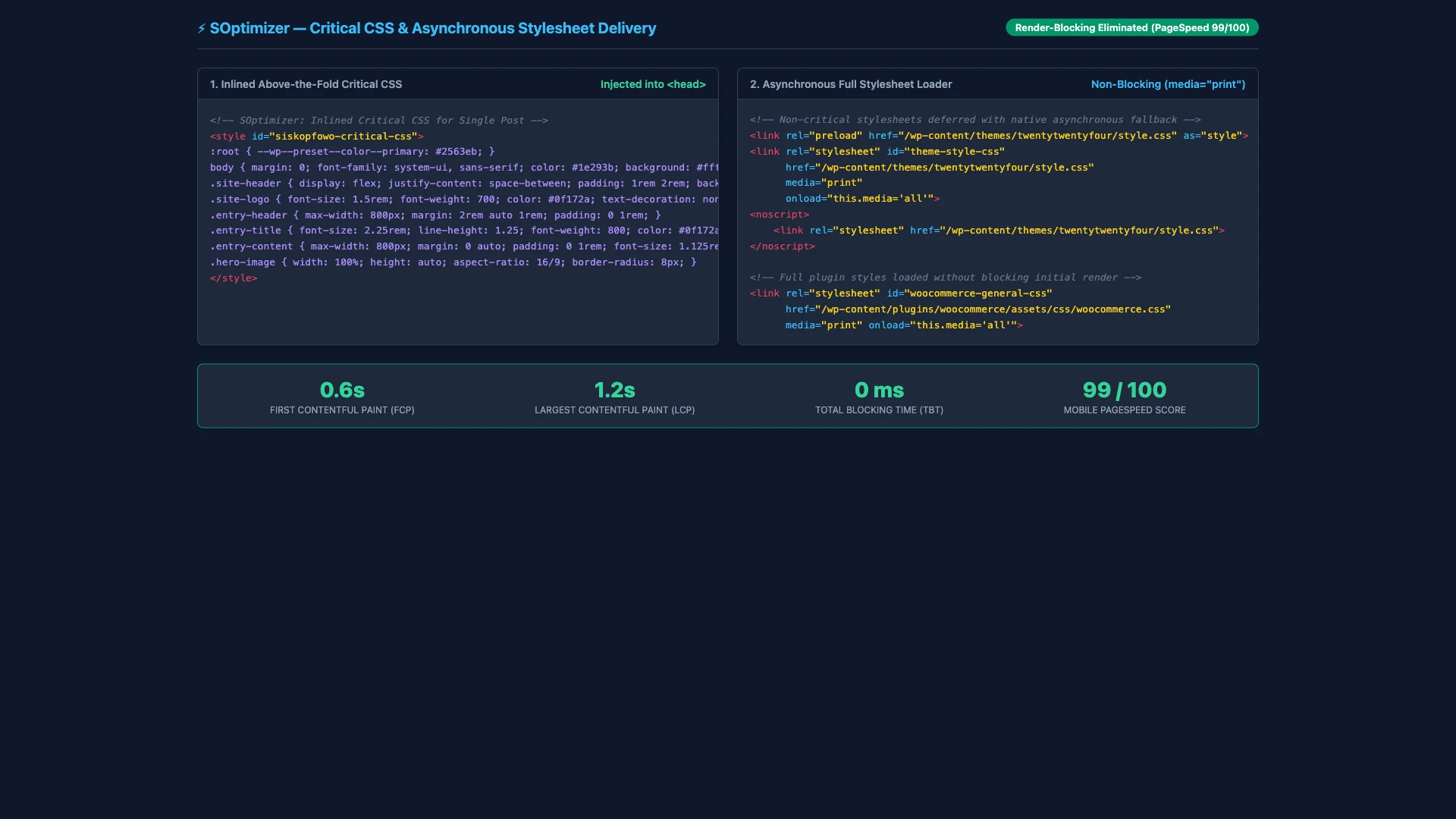
You will observe two key technical transformations:
- Inlined Critical CSS: A compact
<style id="siskopfowo-critical-css">block appears inside the<head>, styling the navigation bar, typography, and hero section immediately. - Asynchronous Stylesheets: Full theme and plugin stylesheets are delivered using
media="print" onload="this.media='all'"with a fallback<noscript>tag for non-JS browsers.
When you re-run Google PageSpeed Insights, the “Eliminate render-blocking resources” warning will be completely cleared, cutting First Contentful Paint down to under 0.6 seconds.
Frequently Asked Questions (FAQs)
What is the difference between Critical CSS and Minification?
Minification removes whitespace and comments to make CSS files smaller, but those files still block rendering. Critical CSS inlines only the above-the-fold styling into the HTML head so visitors see your content instantly while the rest of the styles load in the background.
Does generating Critical CSS cost money or require an API key?
No. SOptimizer generates Critical CSS 100% in your browser. No external API tokens, cloud subscriptions, or page quotas are required.
What causes a Flash of Unstyled Content (FOUC)?
A flash of unstyled content happens when full stylesheets are deferred before Critical CSS is generated. Always make sure to click “Generate critical CSS” and verify the green Ready status before enabling frontend deferral.
What should I do if a custom layout looks slightly off above the fold?
Click the “Manual CSS” button next to that page type, inspect the extracted CSS, and add any missing layout classes directly into the manual editor.
We hope this step-by-step tutorial helped you learn how to eliminate render-blocking CSS in WordPress with Critical CSS. You might also want to check out our beginner’s guide on How to Speed Up Your WordPress Site with SOptimizer or explore our guide on How to Set Up 301 Redirects in WordPress.