Did you know that nearly 7 out of every 10 shoppers who add products to their shopping cart on your WooCommerce store leave without ever completing their purchase?
According to industry research from the Baymard Institute, the average e-commerce cart abandonment rate hovers at an astounding 70.19%. Shoppers get distracted by phone calls, encounter unexpected shipping fees, face payment friction, or simply decide to “think about it” before closing their browser tab. Without an automated recovery system in place, that hard-won traffic and potential revenue vanishes forever.
While standalone cart recovery services and marketing platforms like Klaviyo or Omnisend exist, they charge steep monthly subscriptions that punish store growth. The more contacts and orders you handle, the more you pay every single month. With SiteSkyline Email Campaign Manager, you can capture pending checkouts, trigger automated multi-step recovery sequences, and issue unique single-use discount coupons entirely within WordPress—at zero monthly cost.
In this step-by-step tutorial, we will show you how to set up an automated WooCommerce abandoned cart recovery sequence that turns hesitant shoppers into profitable, completed sales.
Why WooCommerce Cart Recovery is the Highest ROI Activity for Your Store
Most e-commerce marketing tactics focus on driving new visitors through paid ads and search engine optimization. However, abandoned cart recovery targets visitors who have already demonstrated high purchase intent:
- Near-Zero Customer Acquisition Cost: You have already paid the time or ad spend to attract the shopper. Re-engaging them through an automated email costs virtually nothing.
- Industry-Leading Open Rates: Abandoned cart emails routinely achieve open rates above 45% and click-through rates over 10%—tripling the engagement of standard promotional broadcasts.
- Direct Revenue Recovery: Studies show that automated 2-step or 3-step recovery sequences recover between 10% to 20% of otherwise lost orders, providing an immediate top-line revenue lift.
- Objection Handling: A well-timed reminder offers a low-pressure channel for shoppers to ask questions about sizing, delivery times, or return policies before giving up.
| Funkcja | Manual Outreach | SaaS Cart Recovery (Klaviyo/Omnisend) | SiteSkyline Email Campaign Manager |
|---|---|---|---|
| Trigger Mechanism | Manual inspection of pending orders | External JavaScript tracking snippet | Native WordPress & WooCommerce hooks |
| Koszt miesięczny | Free (Time-prohibitive) | ❌ $45 to $350+/month as list grows | ✅ 100% self-hosted, unlimited emails |
| 1-Click Cart Restoration | ❌ Manual checkout links | ✅ Direct checkout URLs | ✅ Native {{order.checkout_url}} merge tag |
| Dynamic Single-Use Coupons | ❌ Manual copy-pasting | ⚠️ Requires API webhooks | ✅ Built-in automated coupon generator |
| GDPR & Privacy Compliance | Manual compliance | ❌ Customer emails transferred to US clouds | ✅ Local database storage, zero leakage |
| Multi-Step Timing Control | ❌ Impossible to manage | ✅ Multi-step automation | ✅ Visual flowchart builder with branch logic |
Step 1: Navigating the Email Campaign Manager Dashboard
To begin, log in to your WordPress admin dashboard and click on Email Manager in the left-hand navigation menu. This opens your central automation control center.
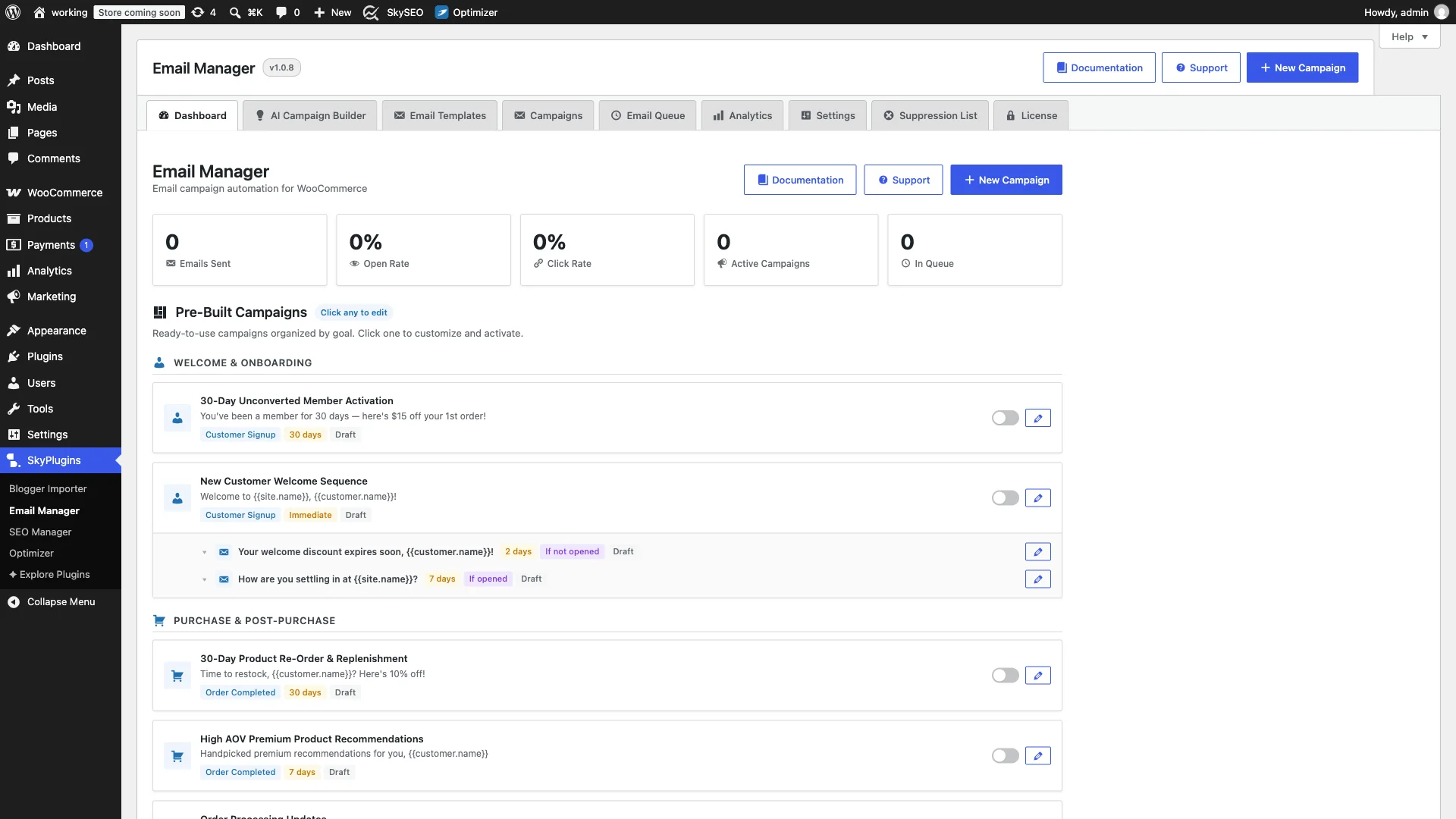
From here, you can monitor sending statistics, review delivery logs, inspect recipient open rates, and jump into campaign creation with a single click.
Step 2: Selecting the WooCommerce Pending Checkout Trigger
Kliknij Create New Campaign button at the top of the screen to open the campaign configuration wizard.
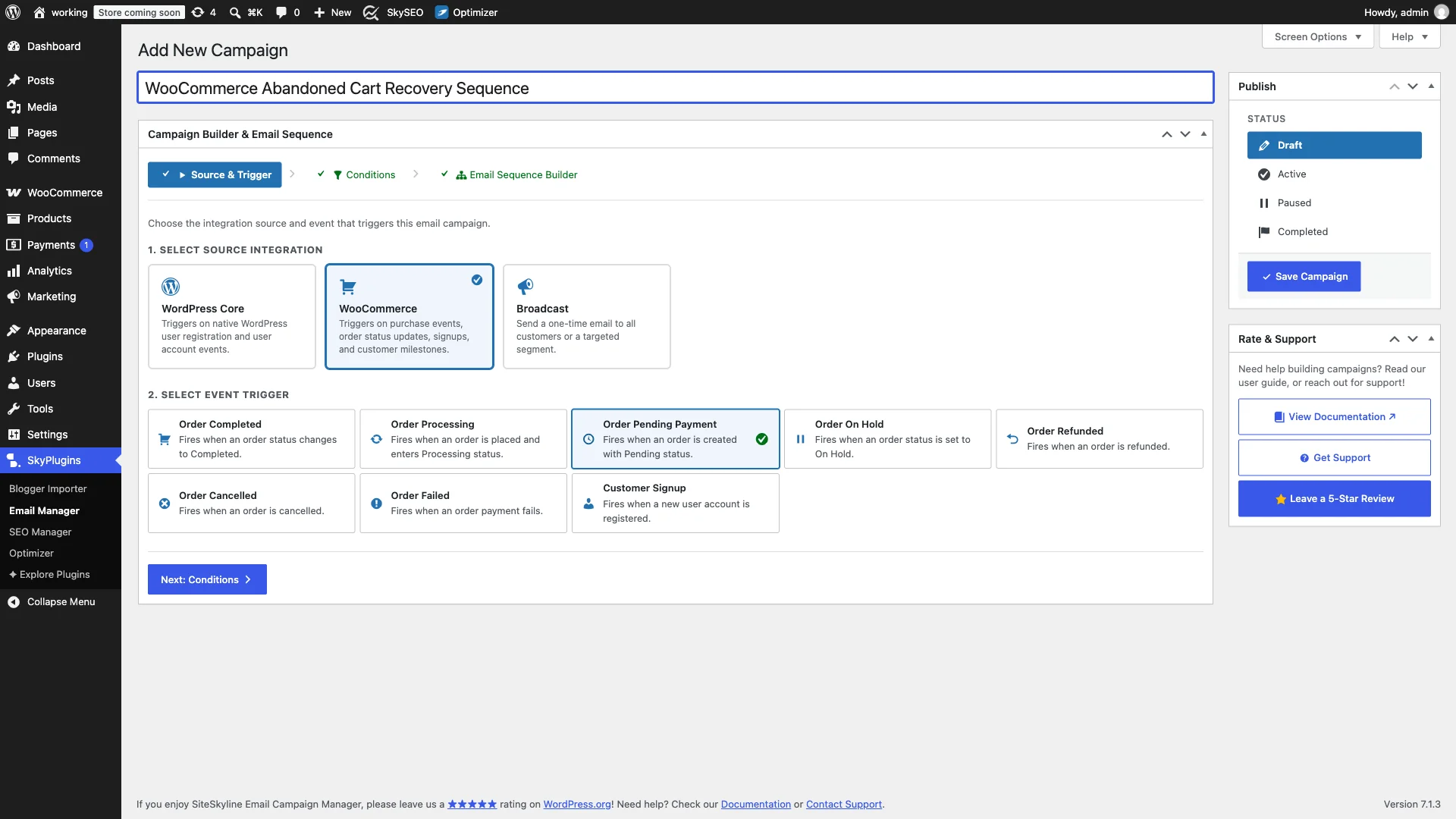
Configure the foundational trigger parameters:
- Campaign Title: Enter a clear descriptive title, such as
WooCommerce Abandoned Cart Recovery Sequence. - Select Source Integration: Kliknij WooCommerce integration card. SiteSkyline automatically binds to your local WooCommerce core hooks.
- Select Event Trigger: Wybierać Order Pending Payment (
order_pending). In WooCommerce, whenever a customer inputs their billing information and initiates checkout—or when an order is created without immediate payment completion—it enters Pending status. This gives your automation the exact hook required to rescue the checkout.
Step 3: Configuring Audience Rules & Cart Value Thresholds
Advance to Step 2: Audience Filters & Rules. This screen allows you to define precision targeting rules so your cart rescue campaigns focus on the highest-margin opportunities.
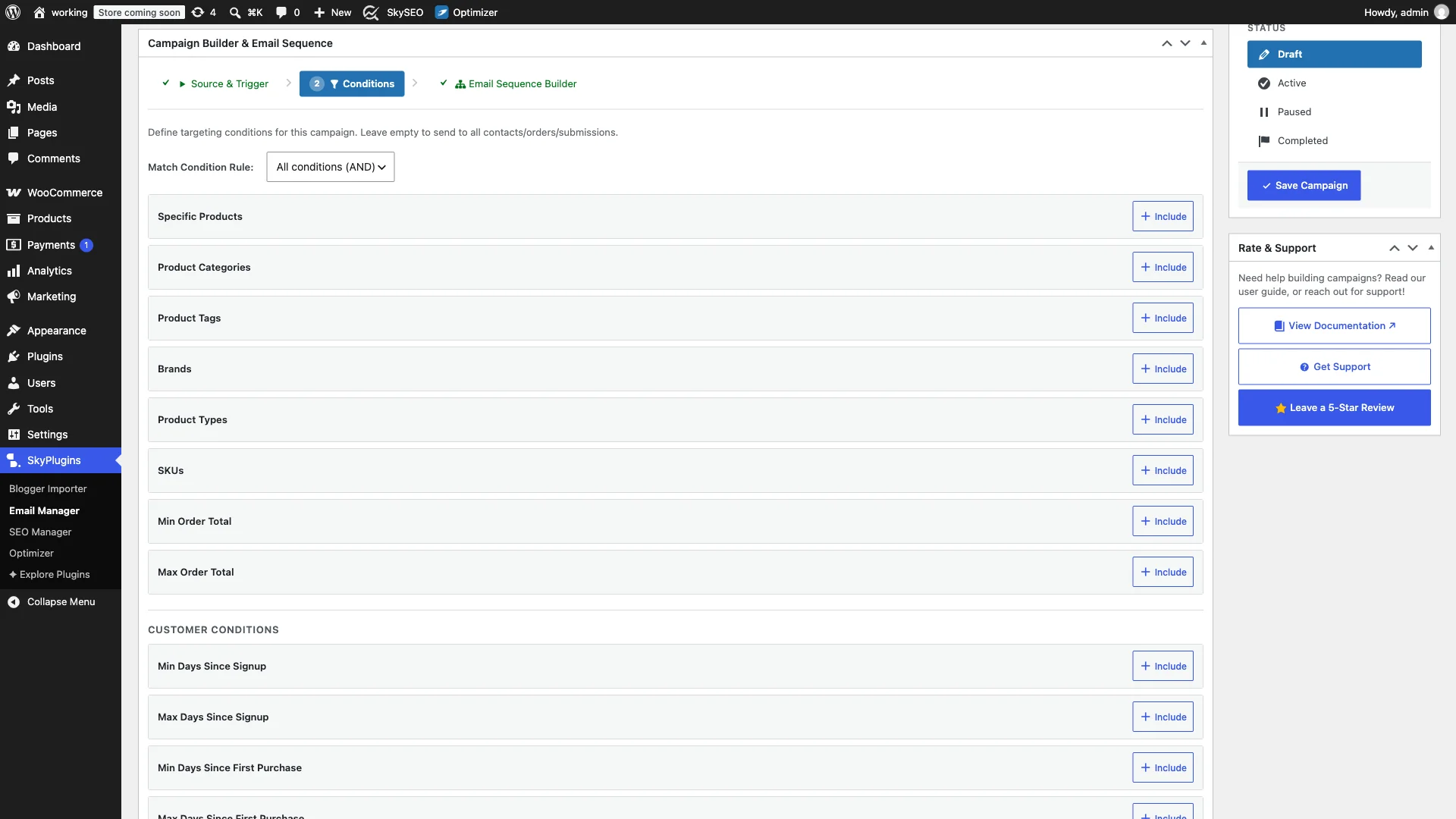
Under the WooCommerce Conditions panel, you can set:
- Minimum Cart Value Threshold: Target shoppers whose uncompleted cart exceeds a specific amount (e.g., $50 or $100), ensuring your discount incentives protect profit margins.
- Specific Categories or High-Margin Items: Create dedicated recovery sequences for luxury or high-consideration product categories that require additional customer assurance.
- Universal Recovery Baseline: Leaving conditions empty targets 100% of abandoned pending checkouts, ensuring no lost customer slips through the cracks.
Step 4: Crafting the Step 1 Friendly Cart Nudge (1-Hour Delay)
Proceed to Step 3: Email Sequence Builder. Trzask Edit Email on the Root Email (Step #1) node to configure the initial recovery nudge.
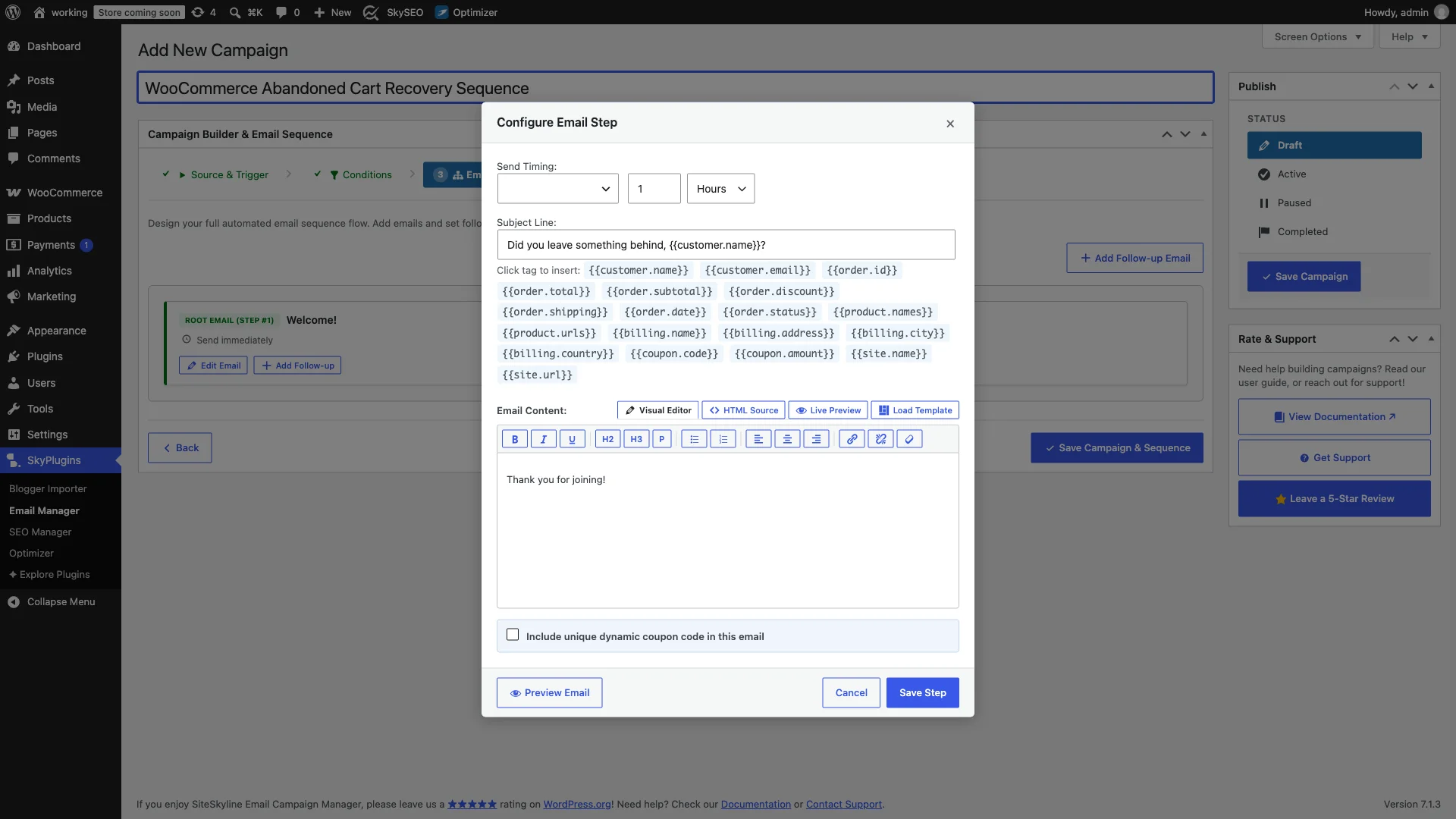
Timing and tone are critical for Step 1:
- Delivery Delay: Ustawić Delay by 1 hour. Never send an abandoned cart email immediately; the shopper might still be browsing or answering a phone call. Sixty minutes is the industry gold standard for maximum conversion without annoying the visitor.
- Helpful, Non-Aggressive Subject Line:
Did you leave something behind, {{customer.name}}? - 1-Click Checkout Restoration Link: Include a direct call-to-action button linking to
{{order.checkout_url}}. When clicked, WooCommerce automatically restores the customer’s cart and brings them straight to the final payment screen.
<p>Hi {{customer.name}},</p>
<p>We noticed you left some great items in your shopping bag at {{site.name}}!</p>
<p>Your reserved items from order <strong>#{{order.id}}</strong> (valued at <strong>{{order.total}}</strong>) are still waiting for you, but popular styles sell out quickly.</p>
<div style="margin:25px 0;text-align:center;">
<a href="{{order.checkout_url}}" style="background:#2271b1;color:#ffffff;padding:12px 24px;border-radius:4px;text-decoration:none;font-weight:bold;display:inline-block;">Complete Your Checkout Now →</a>
</div>
<p>Did you run into any questions about shipping, sizing, or payment? Simply reply to this email—our customer care team is always here to help.</p>
<p>Best regards,<br>The {{site.name}} Team</p>Trzask Save Step to commit the initial nudge email.
Step 5: Adding a 24-Hour Follow-Up with a Dynamic 15% Recovery Coupon
If the first email does not result in a completed checkout, a secondary incentive email captures price-sensitive buyers. Click Add Follow-up on the root node to append Step 2 to your visual sequence tree.
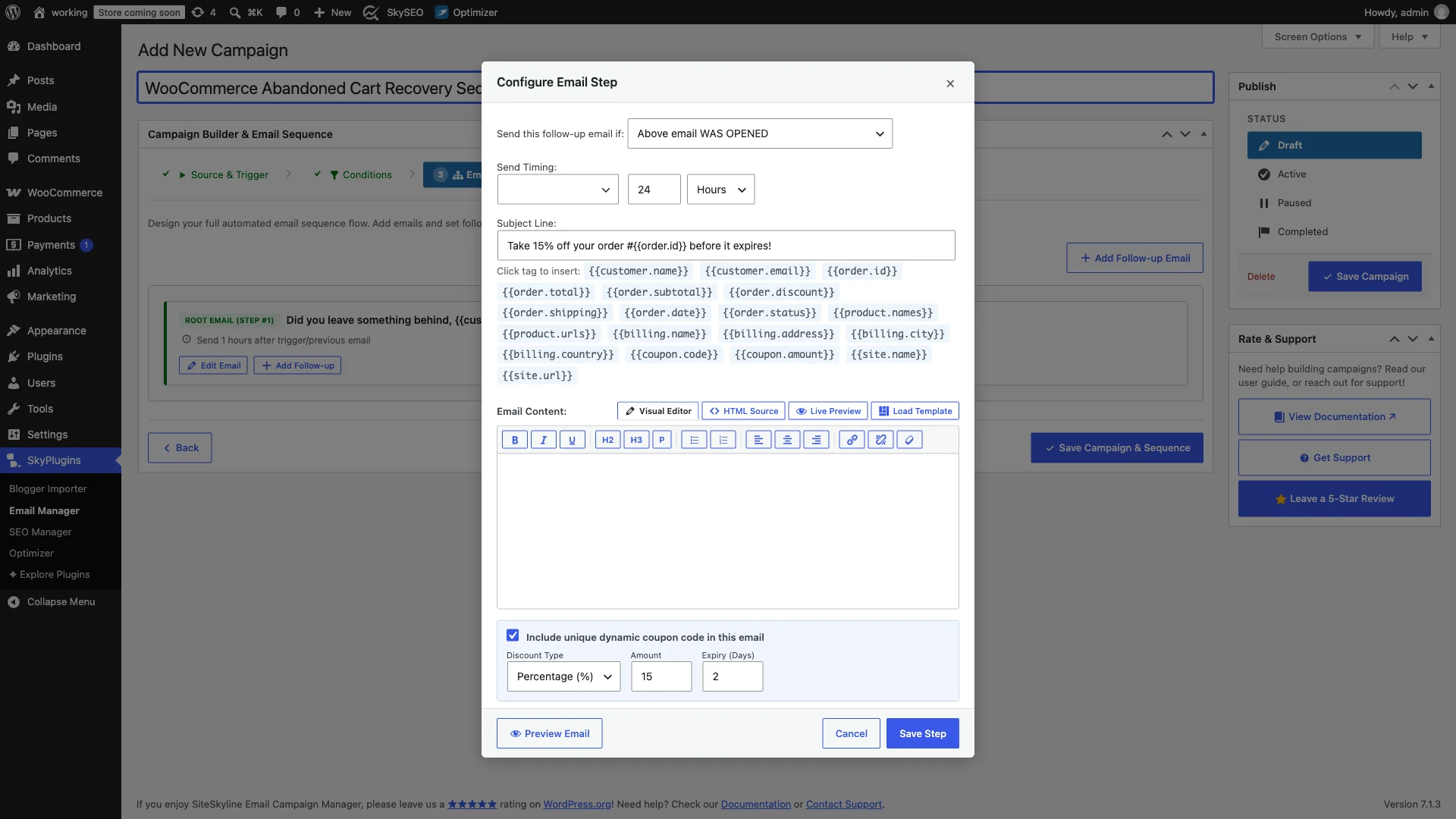
Configure the follow-up step with urgency and value:
- Condition: Set to Opened (or Any) to follow up with shoppers who engaged with your initial inquiry.
- Delay: Set delivery timing to 24 hours. This reaches the shopper at the same time the following day when they are likely back at their computer or phone.
- Subject Line:
Take 15% off your order #{{order.id}} before it expires! - Dynamic Coupon Generator: Enable the Dynamic Coupon option. Set the discount to 15% with a strict 2-day (48 hours) expiration. SiteSkyline automatically creates a randomized, single-use WooCommerce coupon locked to the customer’s billing email.
- Insert Merge Tag: Insert
{{coupon.code}}into your email template alongside an urgency countdown box.
Trzask Save Step to commit the final conversion push.
Step 6: Reviewing the Flowchart, Testing & Activating the Campaign
On the Sequence Builder canvas, review your complete multi-step recovery flowchart. The visual tree outlines the exact progression: Step 1 fires 1 hour after checkout abandonment, followed by Step 2 exactly 24 hours later with the 15% discount incentive.
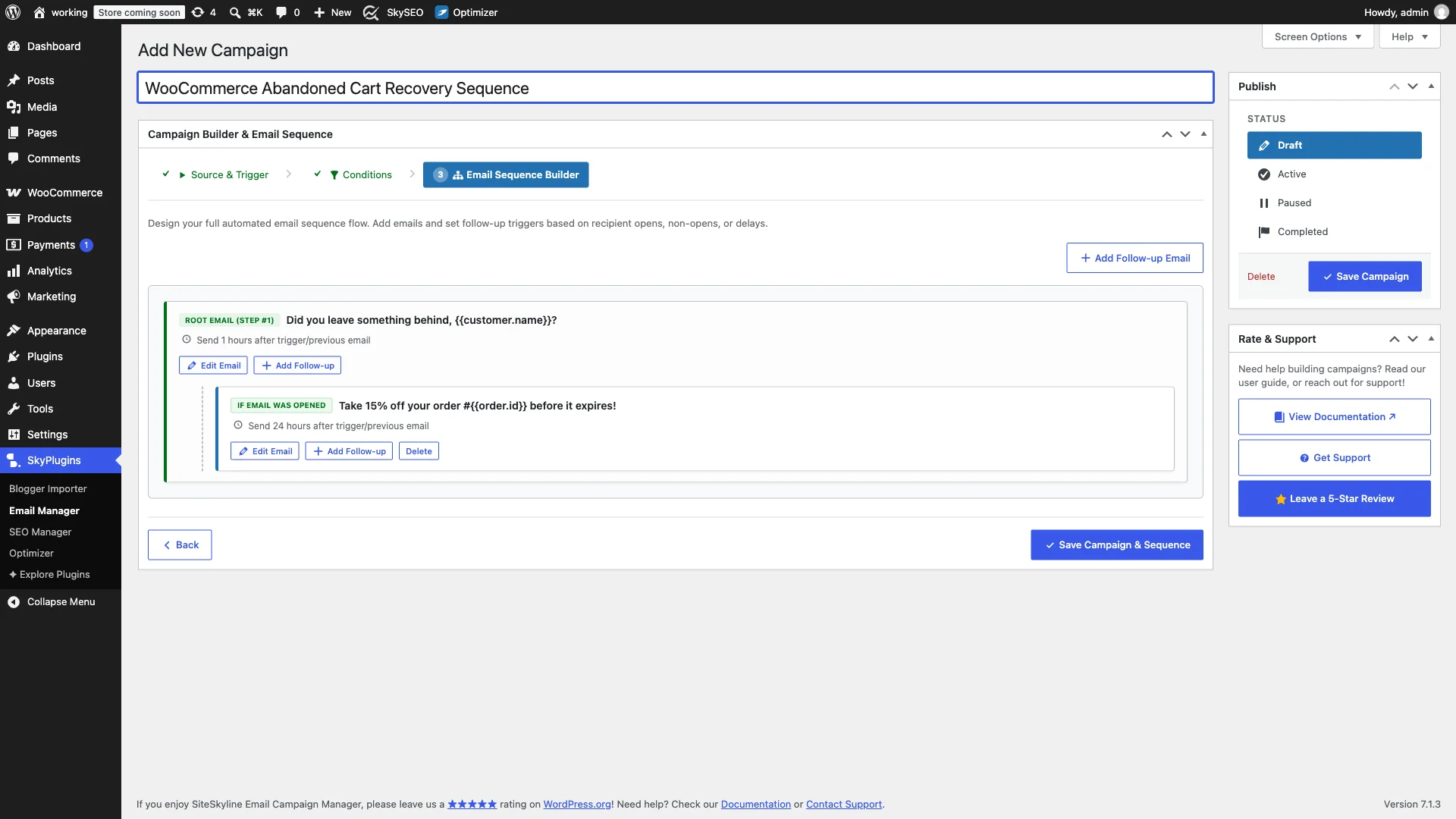
To launch your cart recovery engine:
- Test Deliverability: Open any email step and click Preview / Send Test to verify subject lines, button colors, and merge tag formatting in your own inbox.
- Set Status to Active: In the right-hand Publikować sidebar, select the Aktywny radio option.
- Save Campaign: Kliknij niebieski Save Campaign przycisk.
Your automated abandoned cart recovery workflow is now active! Every pending checkout will be automatically monitored and nurtured by SiteSkyline without requiring any manual intervention.
Top 4 Abandoned Cart Recovery Best Practices
To maximize conversion rates and prevent subscriber fatigue, follow these proven e-commerce guidelines:
- Lead with Service, Not Discounts: Never offer a discount in the first email. Many shoppers abandon carts due to trivial issues like payment questions or wanting to check a measurement. Offering an immediate coupon trains shoppers to abandon carts intentionally to get discounts.
- Inject Scarcity Authentically: Remind shoppers that popular sizes, limited editions, or seasonal colors sell out fast. Real urgency drives action.
- Set Strict Expiration Deadlines: If you offer a 10% or 15% discount code in Step 2, enforce an automatic 48-hour expiration. An evergreen coupon creates zero urgency.
- Automatic Pruning on Purchase: SiteSkyline monitors WooCommerce order status updates. The second a customer completes payment, all subsequent pending emails in their recovery queue are instantly cancelled.
Często zadawane pytania (FAQ)
How does SiteSkyline capture customer emails before order completion?
When a shopper enters their email address on the WooCommerce checkout page, WooCommerce creates a pending order record in the database. SiteSkyline’s order_pending trigger listens for this creation event and schedules your recovery drip in the background delivery queue.
What happens if the customer completes payment after receiving Email #1?
When the shopper completes checkout, WooCommerce automatically updates the order status to Processing lub Completed. SiteSkyline’s queue manager detects this status change and automatically cancels any pending follow-up steps (such as the 24-hour coupon email), ensuring the customer never receives an irrelevant discount after purchasing.
Can coupon codes generated by SiteSkyline be shared on coupon sites?
No. Every dynamic coupon generated by SiteSkyline is uniquely restricted to the specific customer’s billing email address and set to a single redemption limit. Even if submitted to Honey or RetailMeNot, no other customer can redeem it.
Does sending cart recovery emails slow down my checkout page?
No. SiteSkyline uses asynchronous background processing powered by WordPress Cron (wp_cron). Checkout submissions process instantaneously for your customers, while email scheduling occurs entirely in the background.