Did you know that over 40% of all website traffic comes from automated bots rather than real human visitors? While legitimate search engine crawlers like Googlebot and Bingbot are vital for indexing your content and driving organic rankings, malicious scrapers, automated vulnerability probes, and aggressive AI harvesters can drain your server resources, spike hosting costs, and scrape your original content before you even rank.
In this step-by-step guide, we will show you how to monitor search engine crawl activity in real time and automatically block malicious scrapers in WordPress using Menedżer SEO Sky‘s built-in Bot Tracker & Shield module.
Why You Must Track Bots and Block Bad Crawlers in WordPress
Every time a bot requests a page on your WordPress site, your web server must execute PHP scripts, query your MySQL database, and transmit HTML and media assets. When hundreds of rogue bots crawl your website simultaneously, they can cause serious performance issues:
- Wasted Server Bandwidth & High CPU Load: Rogue scrapers ignore crawl-delay rules and bombard your server with hundreds of requests per minute, leading to slow page load times for human visitors.
- Automated Vulnerability Scanning: Malicious bots actively probe for unprotected backup archives, database dumps, sensitive environment files (like
.envIwp-config.php), and vulnerable plugin endpoints. - Content Theft & Scraped Ranking Losses: Automated scrapers steal newly published blog posts within seconds of publication and republish them across spam networks, occasionally outranking the original creator.
- Distorted Analytics: Without bot filtering, rogue crawlers inflate your server metrics and skew traffic analysis.
With Sky SEO Manager, you don’t need expensive enterprise firewalls or complex Nginx server rules to protect your site. Everything can be monitored and managed directly within your WordPress admin dashboard.
Step 1: Open the Bot Tracker & Shield Dashboard
To inspect active bot traffic on your website, navigate to SkyPlugins » SEO Manager from your WordPress admin menu and click on the Bot Tracker patka.

At the top of the screen, you will find four real-time overview cards:
- Total Bot Hits: The cumulative count of automated crawler requests intercepted by your server.
- Unique IPs: The number of distinct IP addresses identified as running automated scraping or indexing scripts.
- Suspicious Hits: The total number of bot requests flagged for anomalous behavior, excessive request frequency, or probing non-existent sensitive URLs.
- Top Bot Classification: Highlights the primary category of automated traffic currently hitting your website (e.g., 404 Probing or Suspicious Scrapers).
Step 2: Inspect Individual Crawler Details & Request Paths
Below the overview cards is the live Bot Logs feed. Each entry details the client’s IP address, assigned classification badge, detection mechanism, total hits, and last active timestamp.
Click on the arrow icon in the first column to expand the complete technical footprint of any detected crawler.

Here you can analyze critical security data:
- User Agent: See the exact client string (e.g.,
curl/8.7.1,Python-urllib, or legitimate crawler signatures). - Last Request URL: Identifies which specific URL or resource the crawler targeted.
- One-Click Action Buttons: If you identify an abusive IP address, simply click Block IP to ban the server immediately, or click Block UA (Robots.txt) to disallow the entire user-agent family via your robots configuration.
Step 3: Filter Between Legitimate Search Bots and Bad Scrapers
Not all bots are hostile. As an SEO specialist or webmaster, you want search engines like Google and Bing to crawl your site as often as possible. Sky SEO Manager categorizes bots intelligently so you can separate friend from foe.
Skorzystaj z Bot Classification filter dropdown to isolate specific traffic segments:

By filtering for Search Engine Crawlers, you can verify when Googlebot last visited your XML sitemaps, which newly updated blog posts were crawled, and whether search spiders encountered unexpected server errors.
Step 4: Configure Bot Shield Protection Settings
Once you have a clear picture of incoming crawler traffic, switch to the Ustawienia sub-tab to activate automated real-time protection.

Recommended settings include:
- Enable Bot Tracking: Activates both server-side request inspection and client-side signal monitoring.
- Block Flagged Bad Bots (Shield): When enabled, any client flagged as a malicious scraper or automated scanner is automatically denied access with a fast
403 Forbiddenpage. Important: Verified search engine crawlers like Googlebot and Bingbot are strictly whitelisted and will never be blocked. - GDPR IP Anonymization: Automatically masks the final octet of client IP addresses (e.g.,
192.168.1.0) before storing records in the database, ensuring 100% compliance with EU privacy laws. - Exclude Logged-in Users: Prevents administrative staff, editors, and registered subscribers from triggering bot false positives.
Step 5: Set Up Rate Limiting, Honeypot Traps & WebDriver Detection
Modern malicious crawlers often disguise themselves behind standard desktop browser user-agents. To combat sophisticated scrapers, Sky SEO Manager provides three layered defense mechanisms:

- Rate Limiting: Enforces a maximum request threshold per minute. If a single IP makes excessive requests faster than normal human navigation, the client is throttled or flagged.
- Honeypot & 404 Probing: Automatically flags crawlers that target sensitive system files (such as
wp-config.php.bak,.gitlub.env) or generate repeated 404 errors within an hour. - Browser-Side WebDriver Detection: Injects a lightweight JavaScript signal test on the front end to detect whether the visitor is controlled by automated headless browser software (like Puppeteer, Selenium, or Playwright).
Step 6: Manage the IP Blocklist Firewall
If you encounter persistent attack networks, rogue datacenter crawlers, or brute-force offenders that continue to probe your website, you can permanently blacklist their IP ranges.
Przewiń w dół do IP Blocklist (Firewall) field, enter the offending IP addresses (one per line), and click the blue Zapisz ustawienia przycisk.
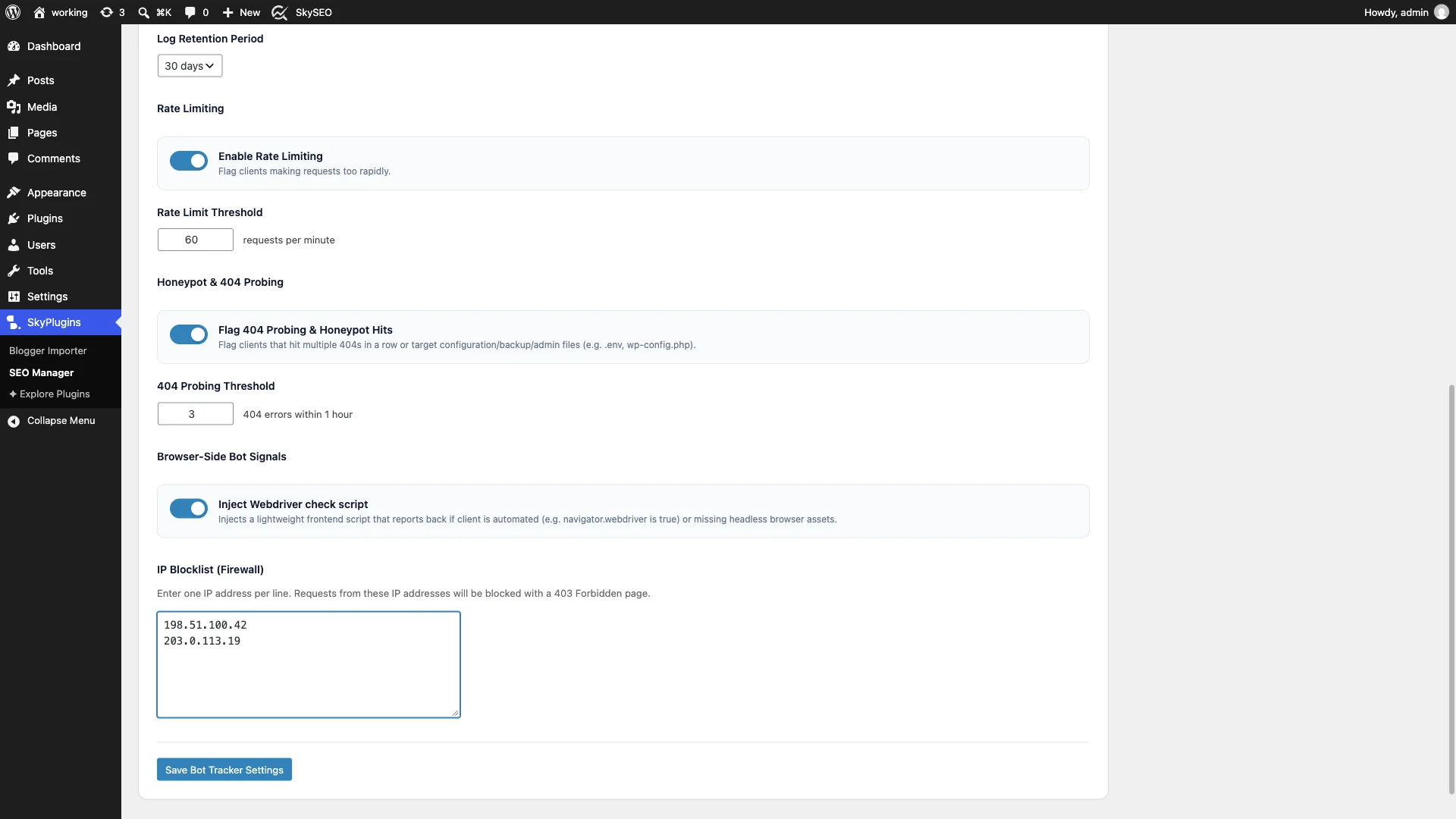
Any future incoming requests originating from these IP addresses will be immediately dropped at the earliest stage of WordPress execution, preventing unnecessary database load and conserving server memory.
Good Bots vs. Bad Bots: Comparison Table
Understanding which bots to welcome and which to block is fundamental to website health:
| Bot Category | Examples | Impact on Site | Sky SEO Manager Action |
|---|---|---|---|
| Legitimate Search Spiders | Googlebot, Bingbot, Applebot, DuckDuckBot | Indexes content, updates search SERP snippets | Whitelisted: Monitored in logs, never blocked |
| Social Media Crawlers | facebookexternalhit, Twitterbot, LinkedInBot | Fetches Open Graph preview cards and images | Whitelisted: Allowed for social sharing |
| Content Scrapers | Custom Python/cURL scrapers, rogue RSS pullers | Steals original text, spikes server bandwidth | Shielded: Flagged and blocked with 403 Forbidden |
| Vulnerability Scanners | ZGrab, WPScan, Nikto, Shodan probes | Scans for outdated plugins, backups, passwords | Honeypot Trap: Instantly blocked upon probing |
| Aggressive Harvesters | High-frequency scrapers exceeding rate limits | Causes 504 gateway timeouts and server crashes | Rate Limited: Throttled and added to blocklist |
Frequently Asked Questions (FAQs)
Will enabling Bot Shield accidentally block Googlebot or Bingbot?
No. Sky SEO Manager features an integrated whitelist verification system for legitimate search engine crawlers. Googlebot, Bingbot, and other verified search spiders are protected and will never be blocked, ensuring your SEO rankings remain completely secure.
How does Bot Tracker affect website performance?
Sky SEO Manager’s bot tracking algorithms are engineered for minimal overhead. Fast hash lookups and memory-efficient database writes ensure that request inspection adds less than 2 milliseconds to page execution. In fact, blocking malicious bots saves substantial server CPU and RAM overall.
Is IP tracking compliant with GDPR regulations?
Yes. By enabling the GDPR IP Anonymization toggle in settings, Sky SEO Manager automatically strips the final identifier from stored IP addresses before logging them to your database, ensuring full compliance with European privacy standards.
Final Thoughts & Next Steps
Keeping your WordPress site fast and secure requires active vigilance. By monitoring crawler traffic with Sky SEO Manager’s Bot Tracker and activating automated shielding against bad scrapers, you ensure that your server resources are preserved for authentic visitors and search engine indexers.
For more technical WordPress optimization tutorials, explore our companion guides on How to Edit Robots.txt and Manage Meta Robots I How to Create and Submit XML Sitemaps with Instant IndexNow.