Struggling to grow your blog on Blogger? If you’re hitting limitations like rigid URLs, lack of customization, or scalability issues, it’s time to switch to a more flexible platform like WordPress. But the fear of losing your hard-earned SEO rankings can feel overwhelming.
Don’t worry! In this comprehensive 2026 guide, I’ll walk you through how to move from Blogger to WordPress in 5分钟内 而不丢失一点SEO价值。
根据我迁移数十个博客的经验,这个逐步过程使用免费的 Blogger导入向导 插件将确保无缝过渡,同时严格保留您的搜索权威。
为什么从Blogger迁移到WordPress?
Blogger is a fantastic platform for beginners due to its simplicity and free hosting. However, as your blog grows, its limitations can hinder your success. Many bloggers hesitate to move to WordPress, fearing they’ll lose rankings or traffic. But with the right approach, you can migrate from Blogger to WordPress without sacrificing SEO and unlock powerful features to boost your site’s performance.
Blogger的主要局限
以下是Blogger可能阻碍你的主要原因:
- 非SEO友好URL: Blogger’s default URL structure (e.g., /year/month/post.html) isn’t customizable, limiting your ability to optimize for search engines.
- 有限的自定义: While Blogger offers themes, they lack the flexibility to fully customize design or functionality, unlike WordPress’s thousands of themes.
- 插件更少: Blogger的集成选项很少,限制了电子商务、高级SEO或分析等功能。
- 缺乏所有权: You don’t fully own your Blogger site, as Google controls the platform, which can limit monetization or branding opportunities.
- 可扩展性问题: Blogger 难以处理大型或复杂的网站,随着流量增长,性能会受到影响。
阅读我们的 Blogger 与 WordPress 终极指南.
为什么 WordPress 是更好的选择
Switching to WordPress gives you unparalleled control and flexibility. Here’s why it’s worth the move:
- 完全控制: 与 Blogger 不同,WordPress 让您控制网站的方方面面,从设计到功能。
- SEO 友好的 URL: 自定义固定链接(例如 yourdomain.com/post-title)以提高排名和可读性。
- 丰富的插件: WordPress 目录中有超过 60,000 个插件,您可以添加 SEO 优化、电子商务或社交分享等功能。
- 强大的主题: 从数千个可定制的主题中进行选择,以匹配您的品牌并改善用户体验。
- 所有权和变现: 在您自己的域名上托管您的网站,以获得完全的所有权和更好的变现选项(例如广告、联盟营销)。
- 可扩展性: WordPress 轻松处理高流量网站,非常适合不断增长的博客。

从 Blogger 迁移到 WordPress 且不丢失 SEO 的分步指南
根据我为客户迁移博客的经验,此过程可确保平稳过渡,同时保留您的 SEO 排名。按照以下步骤从 Blogger 迁移到 WordPress。
前提条件
开始之前,请确保您已具备:
- 一个 WordPress 网站: 设置一个功能齐全的 WordPress 网站,包括域名(例如 yourdomain.com)和主机。信誉良好的主机提供商如 Siteskyline、Bluehost、SiteGround 或 WP Engine 提供一键式 WordPress 安装。
- Blogger 到 WordPress 插件: Install the “Import Wizard Blogspot” plugin from WordPress.org.
- SEO 友好的固定链接结构: 在您的 WordPress 仪表盘中,转到
Settings > Permalinksand set the structure to “Post Name” (e.g.,yourdomain.com/post-title).

步骤 1:安装和配置 Import Wizard Blogspot 插件
- 前往
WordPress Dashboard > Plugins > Add New. - Search for “Import Wizard Blogspot” and install it.
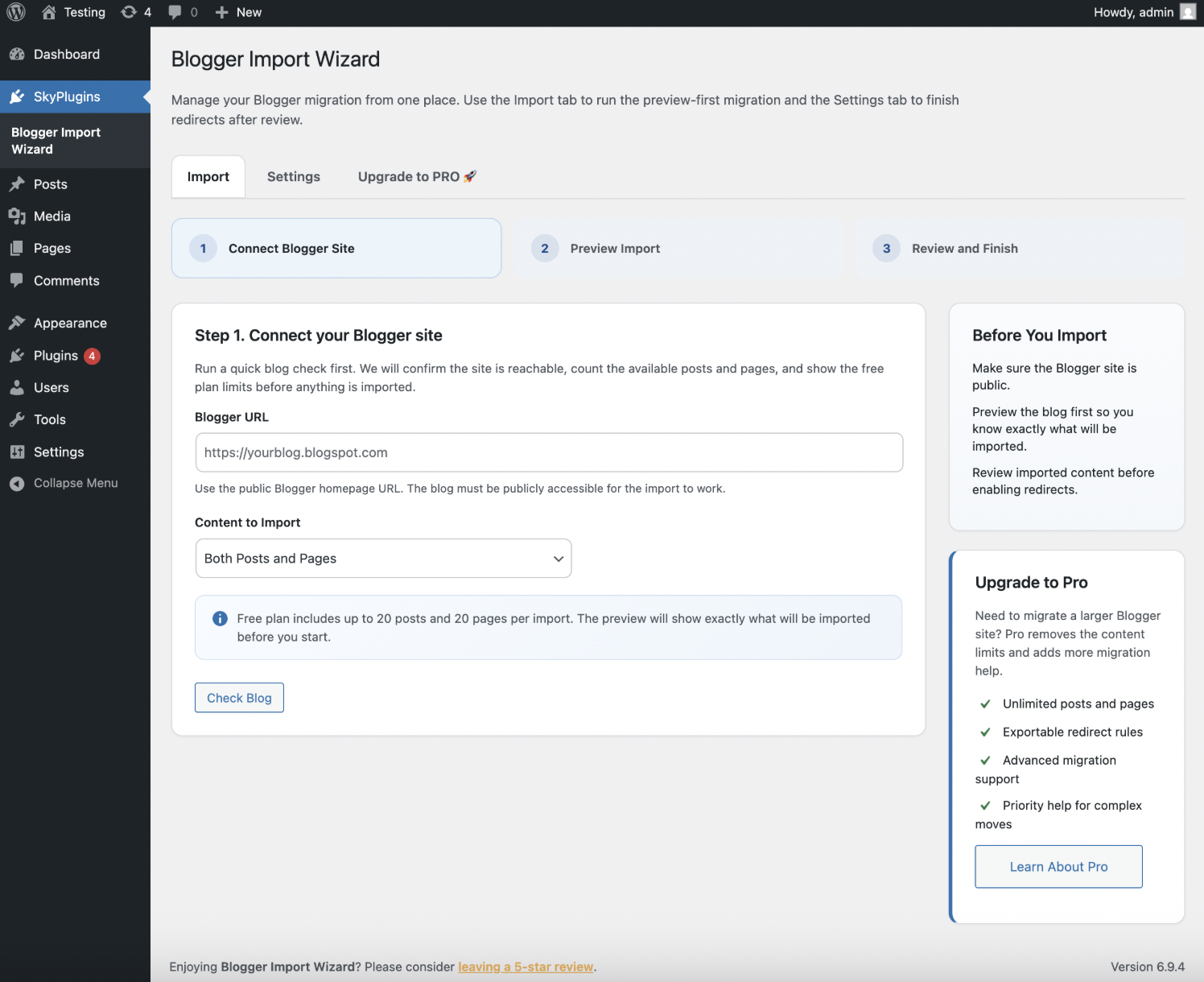
- Activate the plugin and navigate to SkyPlugins > Blogger Import Wizard
步骤 2:导入您的 Blogger 内容
- 在
Blogger Import Wizard, enter your Blogger blog’s URL (e.g.,yourblog.blogspot.com). - 选择要导入的内容:根据您的偏好选择文章、页面或两者。
- 点击
Import并在过程中保持标签页打开,以避免中断。 - 导入后,验证所有文章、页面和评论是否出现在您的 WordPress 仪表盘中。
步骤 3:设置 URL 重定向
为了防止 404 错误并保留 SEO,为您的旧 Blogger URL 启用重定向:
- 前往
Blogger Import > Settings在您的 WordPress 仪表盘中。 - 检查
Enable URL Redirects框并保存设置。 - 这将自动重定向:
- 页面:
/p/page.html→/page/ - 文章:
/year/month/post.html→/post/ - 标签:
/search/label/label-name→/category/label-name/
- 页面:
这确保搜索引擎和访问者被引导到你的新WordPress网址,同时保持你的排名。

第4步:验证和优化
- 检查导入的内容: 审查WordPress中的文章和页面,确保图片、链接和格式正确传输。
- 测试重定向: 访问几个旧的Blogger网址,确认它们重定向到新的WordPress网址。
- 更新内部链接: 使用一个插件,例如
Better Search Replace来更新指向旧Blogger网址的任何内部链接。
第5步:将旧的.blogspot链接更新到你的新域名(如果更改域名)
注意:如果你保持与Blogger上使用的完全相同的自定义域名,可以跳过此步骤。
If you are migrating from a free .blogspot.com address to a brand new custom domain (e.g., yournewdomain.com), your imported posts will likely still contain internal links pointing to the old Blogger address. Here is how to fix them all at once:
- 前往 Plugins > Add New 并搜索 Better Search Replace。安装并激活它。
- 前往 Tools > Better Search Replace.
- 在 “Search for” field, type your old Blogger URL (e.g., https://yourblog.blogspot.com/).
- 在 “Replace with” field, type your new WordPress URL (e.g., https://yournewdomain.com/).
- Highlight the tables you want to update (we recommend selecting wp_posts and wp_postmeta). You can hold Ctrl/Cmd to select multiple.
- 取消勾选 “Run as dry run” 底部的复选框。
- 点击 运行搜索/替换. This will instantly sweep your database and update all old .blogspot links to your new domain!
迁移后SEO技巧以最大化排名
迁移后,优化你的WordPress站点以维持和提升SEO。这些技巧来自我优化博客的经验,与页面SEO最佳实践一致:
- 安装Rank Math SEO插件:
- 使用 排名数学 to add meta titles, descriptions, and schema markup. Set up focus keywords (e.g., “blogger to wordpress”) for each post.Enable 404 monitoring to catch and redirect broken links.
- 为下一代格式优化图片:
- 安装一个插件,例如
ShortPixel或Imagify来将图片转换为WebP格式,提高加载速度和SEO。 - Add descriptive alt text (e.g., “WordPress dashboard for SEO optimization”) to all images.
- 安装一个插件,例如
- 初始使用类似主题:
- 选择一个类似你Blogger主题的WordPress主题,以保持观众的熟悉度。流行的选择包括
Astra或GeneratePress. - 逐步定制主题,以避免让回访者感到困惑。
- 选择一个类似你Blogger主题的WordPress主题,以保持观众的熟悉度。流行的选择包括
- 提交新站点地图:
- 使用Rank Math或Yoast SEO生成站点地图并提交到Google Search Console,以帮助Google索引你的新网址。
- 监控Search Console中的爬取错误以修复任何问题。
- 添加结构化数据标记:
- 使用Rank Math实现文章和作者结构化数据,以通过丰富摘要增强搜索可见性。
- 监控性能:
- 使用Google Analytics追踪迁移后的流量和参与度。
结论
Switching from Blogger to WordPress doesn’t have to mean losing your SEO rankings. By using the Import Wizard Blogspot plugin and following these proven steps, you can move from Blogger to WordPress seamlessly while unlocking powerful features like SEO-friendly URLs, extensive plugins, and full customization. Don’t let Blogger’s limitations hold back your blog’s potential!
准备将您的博客提升到新高度?下载我的免费WordPress SEO清单,优化您的新网站,让排名飙升!立即开始,快速看到结果。